Golf Simulator Software Comparison for UK Clubs in 2026

England Golf participation reporting recorded 12.6 million adults playing some form of golf in the relevant 12-month period, including 5.3 million in off-course formats such as driving ranges, adventure golf, simulators and Topgolf-style venues, as set out in GolfRep's note on starting a simulator business. That is not a niche winter add-on. It is a large slice of how people in England already play.
For a club or indoor venue, a golf simulator software comparison should start there, not with a course library. The licence, the launch monitor it will accept, and the booking and player data it keeps will change bay payback more than a longer list of virtual courses. Graphics get the first wow. The commercial result comes from what the system records, who it lets you charge, and whether the hardware fits the room you have.
Golf Simulator Software at a Glance
A bay's payback turns on three commercial facts: which launch monitor the software will accept, what the licence lets you charge for, and which booking and player records you keep. Course count is the headline buyers quote first. It is the weakest predictor of whether a two-bay install pays for itself.
Home golfers, lesson takers and commercial hire can all land in the same week. The software only does what the launch monitor feeds it, and it only earns its fee if the licence matches how the venue sells the hour.
UK launch monitor comparisons put GSPro at about £250 a year, with other packages running from no recurring fee to nearly £600 a year. The same headline fee can cover one PC, one user, several bays, or a bar on commercial hire.
| Software | Hardware fit | Recurring UK cost | Best suited to | Check before buying |
|---|---|---|---|---|
| GSPro | PC-based, works with supported launch monitors | About £250 a year | Course play and online play for up to eight players | Whether the fee covers one device, several bays or commercial use |
| E6 Connect | Positioned for iPad use | Quoted with the tablet setup, not as a fixed annual line | Tablet-based setups | Accuracy of spin and launch on your own hardware |
| Awesome Golf | Must match a supported launch monitor | Priced by licence type rather than a single published UK fee | Casual play and lighter game modes | Hardware compatibility and licence terms |
| Garmin Home Tee Hero software | Garmin Home Tee Hero | £89.99 a year or £8.99 a month | Home use | Garmin Golf membership needed for full course play |
| Foresight Premier | Foresight launch monitors and Sim-in-a-Box Play | Included in the wider installation rather than sold as a standalone licence line | Practice, play and competition | Total installation cost including VAT |
| TrackMan software | TrackMan dual-radar indoor system | Quoted per bay with the indoor system | Coaching and fitting data | Room depth and licence cost per bay |
About £250 a year on GSPro buys a PC platform with a wide course library and online play for up to eight players. That figure is the published platform fee, not the cost of a two-bay club install, until the supplier confirms the licence covers commercial hire and more than one device. E6 Connect is positioned for iPad use, which changes the computer you buy and how staff start a session. Garmin's figure is a membership for full course play, not a hardware price. Foresight Premier and TrackMan sit inside larger installations, so you price the whole package, including VAT, rather than treating a missing standalone licence line as a discount.
Shortlist two or three platforms that match the hardware and the room you can house. A large course library on a monitor that will not fit, or on a licence that forbids paid hire, does not produce revenue. Where bays are meant to feed the wider club, line the shortlist up with how you already sell digital driving range time, lessons and repeat visits.
Tracking Hardware and How to Test Accuracy
A camera unit beside the ball needs about 4.5 metres of depth. Radar behind the ball typically needs 5 to 6.1 metres. If the bay cannot meet that figure, the licence, the course library and the data the software claims to record never get a fair test, and the bay's payback moves before a single hire is sold.
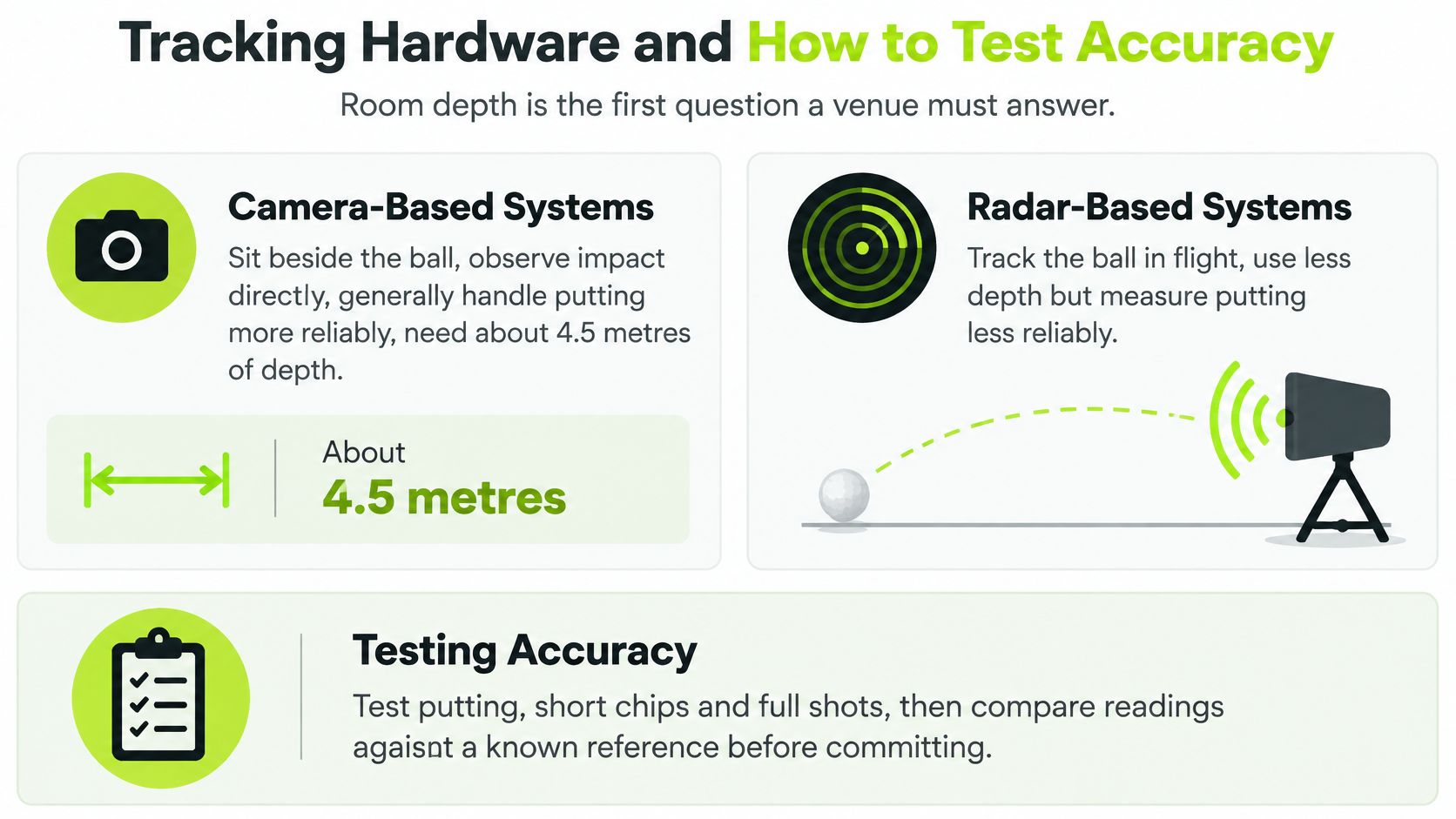
GolfBays' software guide sets the split in those depths. Camera-based systems sit beside the ball, observe impact directly and generally handle putting more reliably. Radar systems sit roughly 1.8 to 3 metres behind the ball and infer parts of the shot from flight.
Two architectures, two rooms
GolfBays' simulator range notes name the working examples. Foresight's GC3 uses three cameras and infrared lighting to measure the first part of ball flight, including spin and spin axis. TrackMan's indoor system uses one radar on the club and one on the ball, plus an integrated camera, and is described as measuring more than 40 parameters: ball speed, launch, spin axis, descent angle, club path, face angle, impact location and dynamic loft.
A camera-led setup can pass the software impact, spin and club-delivery numbers taken at the ball. Radar-dependent software is more exposed to placement, interference and a short indoor flight. A low-ceiling bay with 4.5 metres of depth is a different commercial product from a long teaching bay, even when both screens show the same course.
| Tracking method | Example system | Room depth | Data strengths | Points to test |
|---|---|---|---|---|
| Camera beside the ball | Foresight GC3 | About 4.5 metres | Observes impact directly; handles putting more reliably | Spin and spin axis across the first part of flight |
| Dual radar with integrated camera | TrackMan indoor system | About 5 to 6.1 metres | More than 40 parameters, including club path, face angle and dynamic loft | Placement, interference and indoor flight restrictions |
The column that changes payback is the data, not the course count. Club path, face angle and spin axis are what a fitter sells. A platform that cannot record them in your room cannot support a fitting menu, however large its library.
Why ball speed is the wrong headline
A 2026 comparison summarised by GolfBays found inexpensive monitors kept ball speed within about 1-2% of a reference system, while some units were 20-30% inaccurate for spin rate and launch angle indoors. Software then builds carry, landing angle, rollout and dispersion from those inputs. A tidy ball-speed figure can still send a member home with the wrong gap.
Acceptance rule: if spin or launch error would change the club a coach tells a member to hit, the platform is not ready for paid lessons.
That error also taxes hire. A shot that lands in the wrong place on screen is a session the player does not book again. Supported hardware and the parameters it records decide whether the hour earns its keep.
Run this test before you commit
Ask every supplier for these results in writing, then repeat them in your bay.
- Mounting and depth. Confirm the position and room depth the supplier requires. A unit that needs 6 metres does not become accurate because the screen looks good.
- Your own conditions. Test in the venue's lighting, on the mats and with the balls you will sell. A showroom demo is a different environment.
- A fixed shot list. Hit the same shots beside a calibrated reference monitor so the comparison is measured, not impressionistic.
- Split the bag. Record carry, spin rate and launch angle for drivers, irons, wedges and putts. Putting is where camera and radar most often part company.
- Mean absolute error. Average the absolute gap on each metric and each club group. One flattering drive does not clear a wedge.
- Latency. Time impact to the rendered shot. Slow rendering wastes a busy lesson and a pay-and-play hour.
- A reject line. Drop any platform whose spin or launch error would distort coaching or gapping. Course count does not repair that, and a licence on hardware the room cannot house does not either.
Pricing and Total Cost of Ownership
The subscription is one line. The budget is the hardware, the enclosure, the computer, VAT, and the software tier you need for the experience you intend to sell.
GolfBays' home simulator pricing lists Garmin Home Tee Hero at £8.99 a month or £89.99 a year. The annual plan is about £7.50 a month, and full course play needs a Garmin Golf membership. A launch monitor advertised with no subscription can still need paid software for courses, multiplayer or analytics. If a committee is also looking at domestic setups, it helps to compare home golf simulator costs before anyone treats a home bundle as a commercial quote.
A payback sum the committee can repeat
- Add one-off hardware, enclosure, computer and VAT.
- Add the annual licence for each device, user or bay, using the supplier's own definition.
- Divide first-year cost by the bookable hours that installation makes available.
- Set that cost per hour against net margin from bay hire, coaching and any membership attached to the bay. The gap is your payback period.
Say two commercial bays each sit on a licence around the £250 mark. Software alone is £500 a year before a screen, a projector or a fitting. That is inside the spread the market already shows, from no fee to nearly £600, and it is still only the licence. The payback moves when the fee is per bay rather than per site, or when commercial use needs a dearer tier.
Agree the payback target before you compare quotes. A platform that misses that target on paper will not be rescued by a longer course list.
Price the hour the member buys, not the app. Our notes on golf simulator bay pricing are the place to test whether that hour still leaves margin once the licence, VAT and quiet weekday slots are in the sum.
Turning Simulator Visits into Members and Repeat Play
BBC Sport reported that 82% of traditional golfers in Britain and Ireland had tried an alternative format, including simulators, pitch-and-putt and adventure golf. In England, 36% of people who played an alternative format did so before a conventional course. The same report noted England Golf data showing visits to ranges and simulators were comparable with visits to play nine or 18 holes.

A simulator hour can be the first time someone meets your club. Software that only stores bay minutes throws that introduction away.
What the platform needs to record
Guest accounts separate a first visit from a member card. Beginner modes let a family finish a session without a lecture on spin axis. Repeat-visit records show who came back. Referral tracking shows who brought them. Lesson booking from the same profile turns a fun hour into coaching revenue. Automated follow-up after the visit only works if the booking captured a real contact.
Guest WiFi can be part of that capture when people won't fill a paper card. Purple Access on WiFi marketing is a useful primer on what a sign-in can collect, provided your simulator profile and your club records aren't two strangers.
A monthly report worth reading
GolfRep recommends source-level reporting rather than raw enquiry counts, so you can see what came in, what happened next, and whether that source produced one booking or ongoing revenue. We use AI automations and data tracking so a first simulator visit isn't lost between the bay PC and the office.
Each month, pull four lines:
- Bookings by source, so a campaign is judged on who arrived, not on clicks.
- First visits that became a second visit, split by member and guest.
- Lessons booked from simulator users, not lessons booked by anyone.
- Membership enquiries that started in the bay, tied back to the campaign.
The first metric to watch is simple. What share of first-time simulator visitors book again within 60 days? If that share is thin, fix the second visit before you add courses. How clubs keep people after the novelty fades is covered in our piece on indoor golf customer retention.
Usability, Set-up and Support
Accuracy on a spreadsheet doesn't matter if Saturday staff can't start a session. Usability is whether the software is used when the tee sheet is full and the coach is late.
An afternoon test
Block one afternoon and time it.
Set-up. Time unboxing to the first shot, including projector, PC or tablet, and the launch monitor. A long set-up becomes a locked bay every time something is moved.
A cold user. Ask a staff member with no simulator experience to run a full hour from the supplier guide only. If they need you in the room, members will need you too.
Three clocked jobs. Time a lesson start, adding a guest, and closing the booking. Those three actions are most of a commercial hour.
The actual device. A tablet-led platform such as E6 Connect and a PC platform such as GSPro feel different in a busy bay. Test the device you will leave in the room, not a laptop from the office.
Saturday load. Online play only earns its fee if the bay network and the internet hold when other rooms are busy. Lag that appears at 4pm is the test that matters.
Support in writing. Ask for channels, response times and the update policy. Find out whether an update can change course behaviour or spin readings, and record the numbers again after the bay opens. A silent update can move the data a coach trusts.
Score it before you shortlist
Give each item 1 to 5. A platform under 3 on staff confidence or support response is a staffing problem you will pay for every week.
| Item | What a 5 looks like | Score 1–5 |
|---|---|---|
| Set-up time | First shot without a specialist | |
| Staff confidence | Cold user finishes a session | |
| Guest booking time | Guest added and closed quickly | |
| Support response | Written times you can live with | |
| Update policy | Changes flagged before numbers move |
Choosing Software by Buyer Type
The right platform is the one whose licence, data and room match the buyer. A home golfer, a coach, a single bay and a multi-site group are not shopping for the same product.
Home golfer
You want low recurring cost, a simple set-up and enough course play to keep going through winter. Check whether full play needs a Garmin Golf membership or something like it. The common mistake is paying for a huge library and using six courses.
Coach
Choose on spin and launch accuracy, session records, and a clean way to show a student their numbers. Course count is the wrong sort. If you sell club fitting, you need club path, angle of attack and impact data, not a prettier fairway.
Single-bay commercial operator
You need guest accounts, bay booking, and a licence that covers one device and paid hire. Ignoring a home-use clause is how a cheap annual fee becomes a problem after the first invoice.
Multi-bay and multi-site
You need a licence definition per bay, one place to control bookings, and reports you can compare. Separate software on each site makes a good Saturday at one venue invisible to the others.
Foresight Sports positions Premier for practice, play and competition, and its Sim-in-a-Box Play package starts at £9,990 excluding VAT. That package price is the point. A commercial install carries enclosure, projector, computer, software and VAT that a home setup never meets. The same systems can report ball speed, launch angle, spin rate, spin axis, club-head speed, efficiency, angle of attack and club path, which is the data set you want if coaching and fitting are on the price list. Set that full cost against expected bay use before you treat any app fee as the decision.
| Buyer type | Features to prioritise | Licence question to ask | Common mistake |
|---|---|---|---|
| Home golfer | Simple set-up, course play, low recurring cost | Is a Garmin Golf membership or equivalent needed for full play? | Paying for courses rarely used |
| Coach | Accurate spin and launch data, session records | Does the licence cover the coach and their students? | Choosing on course count, not data accuracy |
| Single-bay commercial | Guest accounts, bay booking, device licence | Does the fee cover one device and commercial use? | Ignoring commercial licence terms |
| Multi-bay venue | Licences per bay, booking control, reporting | Is the price per bay or per site? | Buying bays with mismatched software |
| Multi-site operator | Central CRM integration, consistent reporting | Can all sites feed one reporting view? | Separate systems that cannot be compared |
GolfRep recommends multi-site operators roll the same sales view up across venues, using a CRM consistently, so a simulator booking in one hotel or club can be read beside the others. The first call with us is an open conversation about your current setup, goals and constraints, not a pitch, and it is where a bay system gets mapped onto pricing and membership rather than left as an hourly till.
Before anyone signs, get five things on paper. Accuracy results from your own test. Room depth confirmed by the supplier. Full licence terms, including commercial use. Total cost including VAT. Export of bookings and player data. Run the accuracy test on two shortlisted platforms first. The course list can wait until the numbers and the contract survive that test.
GolfRep helps UK clubs and indoor facilities turn simulator demand into repeat play, lessons and membership, with the booking data and follow-up tied to how you price the bay. If you want that commercial map set against the software you are about to buy, start with GolfRep.
Ready to tap into our proven growth system?