SMS Automation System for Golf Clubs: A Practical Guide
A prospective member fills in an enquiry form after work. A society organiser is waiting for confirmation before contacting their group. A lapsed golfer has asked whether a preferred tee time has become available. In each case, the phone is already in the golfer's hand, and the commercial question is simple: will the club respond while the decision is still active?
Email still has an important role, and a phone call remains better for complex conversations. SMS earns its place when the message is timely, useful and easy to answer. It shouldn't become another broadcast channel bolted onto the club's CRM. It should become a controlled decision-support layer that helps members, prospects and staff take the next sensible step.
Why SMS Still Earns Its Place in a Golf Club Mix
A membership prospect who receives a prompt confirmation can book a tour while they're still considering the club. A visitor who gets a clear tee-time reminder is less likely to miss the booking or overlook a change. A lapsed member who receives a considerate question may tell the club what support they really need, rather than disappearing into an unsegmented email list.
That immediacy is the commercial reason to use an SMS automation system. It doesn't replace email, CRM tasks or personal conversations. It gives the club a direct route for moments where delay can affect attendance, confidence or a joining decision.
The UK has a particularly strong foundation for this channel. On 3 December 1992, Vodafone engineer Neil Papworth sent the first text message to a Vodafone mobile phone in Berkshire. Vodafone introduced commercial text messaging in the UK in 1994, cross-network compatibility became established in 1999, and UK users sent approximately 51 billion SMS messages in 2006, 66 billion in 2007 and more than 150 billion in 2011, as documented by the BBC's history of SMS. SMS is mature infrastructure, not a passing marketing fashion.
Commercial rule: Send a text when the recipient benefits from acting promptly. Don't send one simply because the system can.
Clubs already familiar with gym sign-up text campaigns will recognise the wider pattern. The useful question isn't whether SMS can generate attention. It's whether a specific club event justifies interrupting someone's day, and whether the club can handle the reply properly.
This guide focuses on that decision. It covers the system design, the features worth paying for, UK consent controls, CRM connections, golf-specific workflows and the situations where email, a call or silence is the better choice.
What an SMS Automation System Actually Does
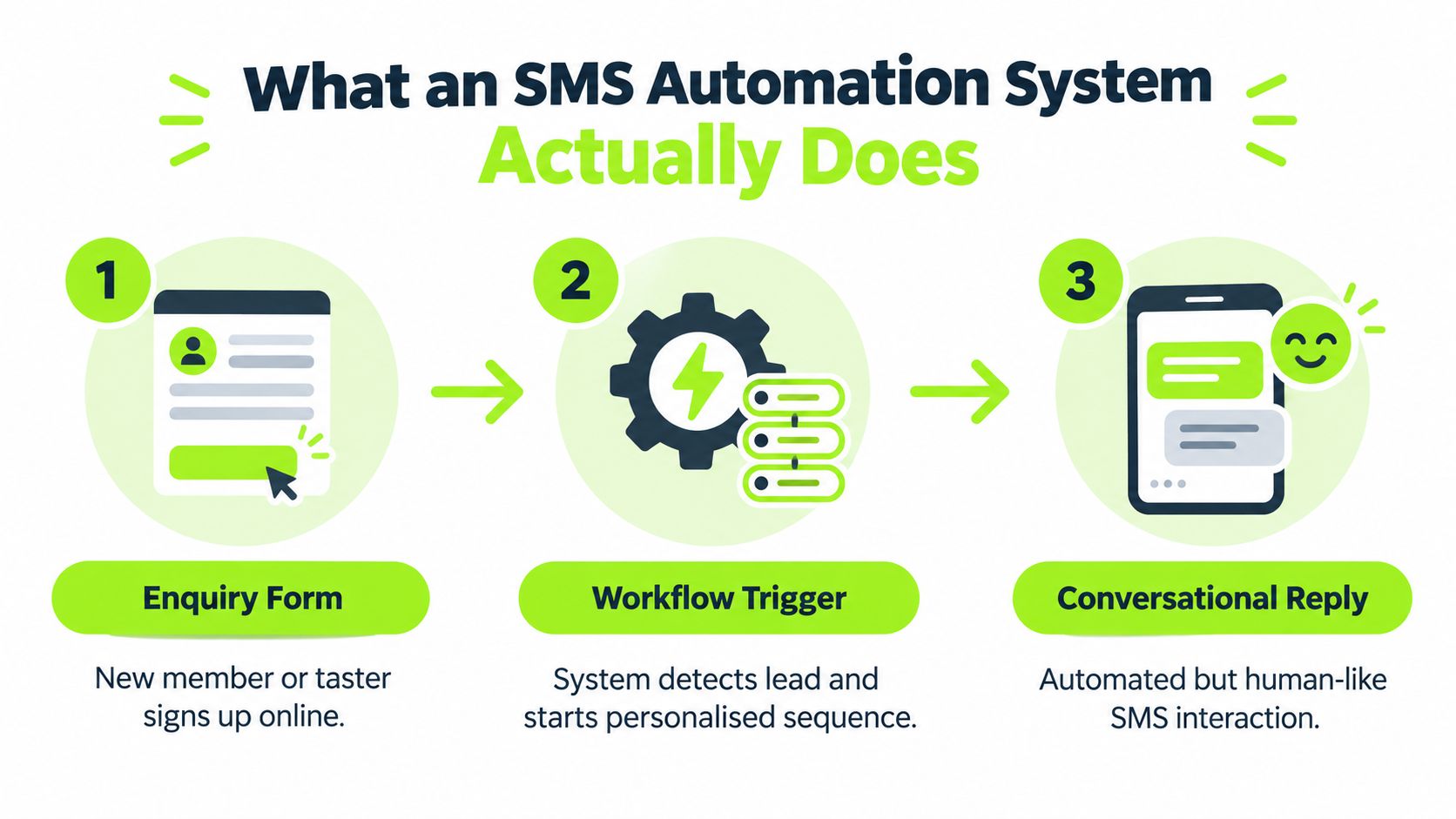
An SMS automation system is an event-driven workflow, not a list of phone numbers with a send button. Think of it as a digital member of the club office team. It watches for defined events, checks the relevant rules, sends the appropriate message and records what happened.
A broadcast starts with a selected audience and sends the same campaign to that group. A triggered message starts with an event, such as a new membership enquiry, confirmed tee time, cancelled booking or renewal stage. A two-way workflow adds the important final step, it receives a reply and either completes a simple action or gives a staff member enough context to take over.
The working parts
A practical system should connect these functions:
- Capture: Collects the phone number and the event that started the journey, such as a form submission or booking.
- Consent recording: Stores the permission state, timestamp, source and wording rather than treating every CRM number as marketable.
- Segmentation: Separates membership prospects, visitors, society organisers, members, lapsed golfers and event contacts.
- Message orchestration: Selects the template, timing and personalisation based on the event and segment.
- Delivery reporting: Records whether the provider accepted and delivered the message, including the final rendered version.
- Reply handling: Routes answers, questions and keywords to the right workflow or staff member.
- Suppression management: Stops future promotional sends after an opt-out or other exclusion event.
The distinction between transactional and promotional messages controls the operating model. A booking confirmation is connected to a service the recipient requested. A message promoting membership, an offer or a renewal decision is marketing and needs separate controls.
That difference matters because a club can accidentally attach a sales message to an operational notification and assume the whole text remains transactional. It doesn't. Build the workflow so the purpose of each message is explicit before the send is approved.
Core Features That Matter for a Golf Club
The right platform changes staff behaviour. A basic tool sends texts. A suitable system helps the club decide who should receive a message, what happens after a reply and when every further send must stop.
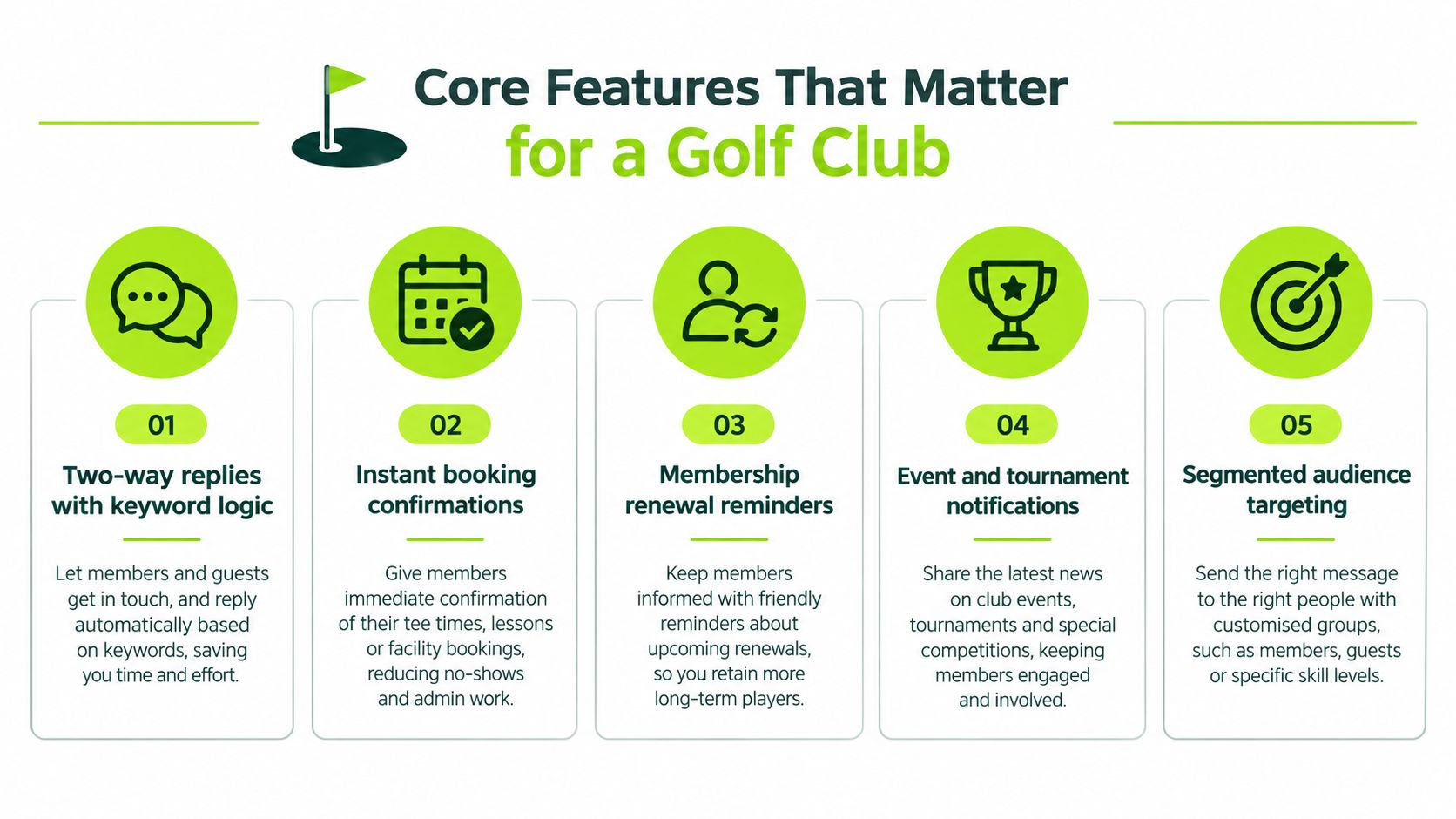
Use the following five features as a provider shortlist. Ask to see each one working with a realistic golf-club scenario, not a generic software demonstration.
Two-way replies with ownership
A reply such as “Can I bring a guest?” or “I need to speak to someone about flexible membership” isn't a delivery metric. It's a commercial conversation. The system should place the reply in a shared inbox or CRM record, identify the contact and assign ownership to a named person.
Keyword logic is useful for simple responses. “STOP” should suppress promotional communication. “TOUR” could return a booking link or create a task, provided the workflow is designed and tested properly. Anything involving pricing objections, accessibility, financial difficulty or a complicated membership structure should move to a human.
Event triggers rather than calendar blasts
A new enquiry, confirmed tee time, opened slot or missed renewal milestone should trigger the relevant workflow. Timing then follows the golfer's situation rather than an arbitrary campaign calendar.
For example, when a visitor booking is confirmed, the system can send the operational confirmation. If the booking changes, the workflow can issue an updated notification instead of making staff search through a campaign list.
Personalisation that survives the real message
Personalisation should include the golfer's name, relevant facility, booking detail or next action. It must also be tested after links and dynamic fields are inserted. A message that looks short in a CRM can become longer once the name, venue and booking link are rendered.
Suppression that works everywhere
If a recipient replies STOP after a renewal reminder, the system must suppress that person across scheduled campaigns, CRM journeys and connected tools. Delayed suppression is a trust failure and a governance problem.
Reporting by commercial outcome
Track delivery, replies and opt-outs, but don't stop there. For a membership sequence, connect the SMS activity to booked visits, attended visits, applications and completed joins. For visitor golf, track booking attendance and recovered tee-sheet opportunities.
The GolfRep guide to golf club marketing automation provides useful context on connecting automated activity to the wider commercial process. An SMS dashboard that cannot connect activity to club outcomes is a messaging report, not a revenue report.
UK Consent and PECR Rules for Promotional Texts
For a UK golf club, promotional SMS to an individual golfer is treated as electronic-mail marketing under the Privacy and Electronic Communications Regulations 2003, or PECR. The default control is specific consent. A telephone consent record doesn't automatically permit marketing texts, and a broad permission for “electronic communications” may not be specific enough for SMS, as set out in the Information Commissioner's Office guidance on electronic-mail marketing.
The consent record should identify the organisation, explain that marketing texts will be sent and provide a straightforward withdrawal route. A pre-ticked box isn't valid. The recipient must take a clear positive action, and the CRM should retain the timestamp, source, wording and channel.
Capture permissions by purpose
Don't use one unrestricted marketing flag. A club should be able to distinguish permissions for:
- Membership enquiries
- Visitor offers
- Events and tournaments
- Renewal reminders
This separation makes the system safer and gives the recipient a clearer choice. Every promotional text must identify the sender and provide a functional opt-out route. If the club uses “Reply STOP”, that route must work and the suppression must flow immediately through campaign queues, CRM workflows and integrations.
The soft opt-in can apply where a person previously bought or negotiated to buy a similar service, received an opt-out opportunity when their details were collected and receives an opt-out in every subsequent message. Treat it as a controlled exception, not a shortcut for importing old phone numbers.
Transactional messages still need careful drafting. A booking confirmation can contain essential booking information. Adding an unrelated membership promotion changes the risk profile and may make the message promotional.
| Message type | Example | PECR consent needed | Required content |
|---|---|---|---|
| Transactional SMS | Booking confirmation or tee-time change | Depends on the message purpose and applicable rules | Identify the club where appropriate, provide accurate service information and a route for help |
| Promotional SMS | Membership offer or visitor campaign | Specific consent, or a compliant soft opt-in | Identify the sender and provide a working opt-out route |
| Mixed-purpose SMS | Booking update with a membership promotion | Treat the promotional element as marketing | Separate the operational information from the promotion and include the required opt-out |
| Renewal communication | Prompt to consider renewing or continuing membership | Check whether the wording is promotional and whether permission or a valid exception applies | Identify the club and make withdrawal straightforward |
The GolfRep perspective on golf club email marketing is relevant here because channel permission should be managed deliberately. A person's consent for email is not a licence to assume consent for SMS.
Connecting SMS to Membership CRM and Nurture Flows
The integration should begin with data ownership, not message copy. Decide which system holds the contact record, which system holds consent, where staff see replies and which platform controls suppression. If those answers are unclear, adding SMS will create another disconnected inbox.
A workable handoff looks like this:
- A web form captures the enquiry, phone number, source and specific SMS permission.
- The CRM stores the consent wording, timestamp and named organisation or brand.
- The contact enters a segment based on intent, such as membership, taster session or visitor golf.
- The SMS platform sends the first permitted message and records the provider result.
- Replies are written back to the contact record and assigned to a staff owner.
- A reply, booking or human intervention pauses the automated sequence.
- STOP or another withdrawal request enters the central suppression list before further promotional execution.
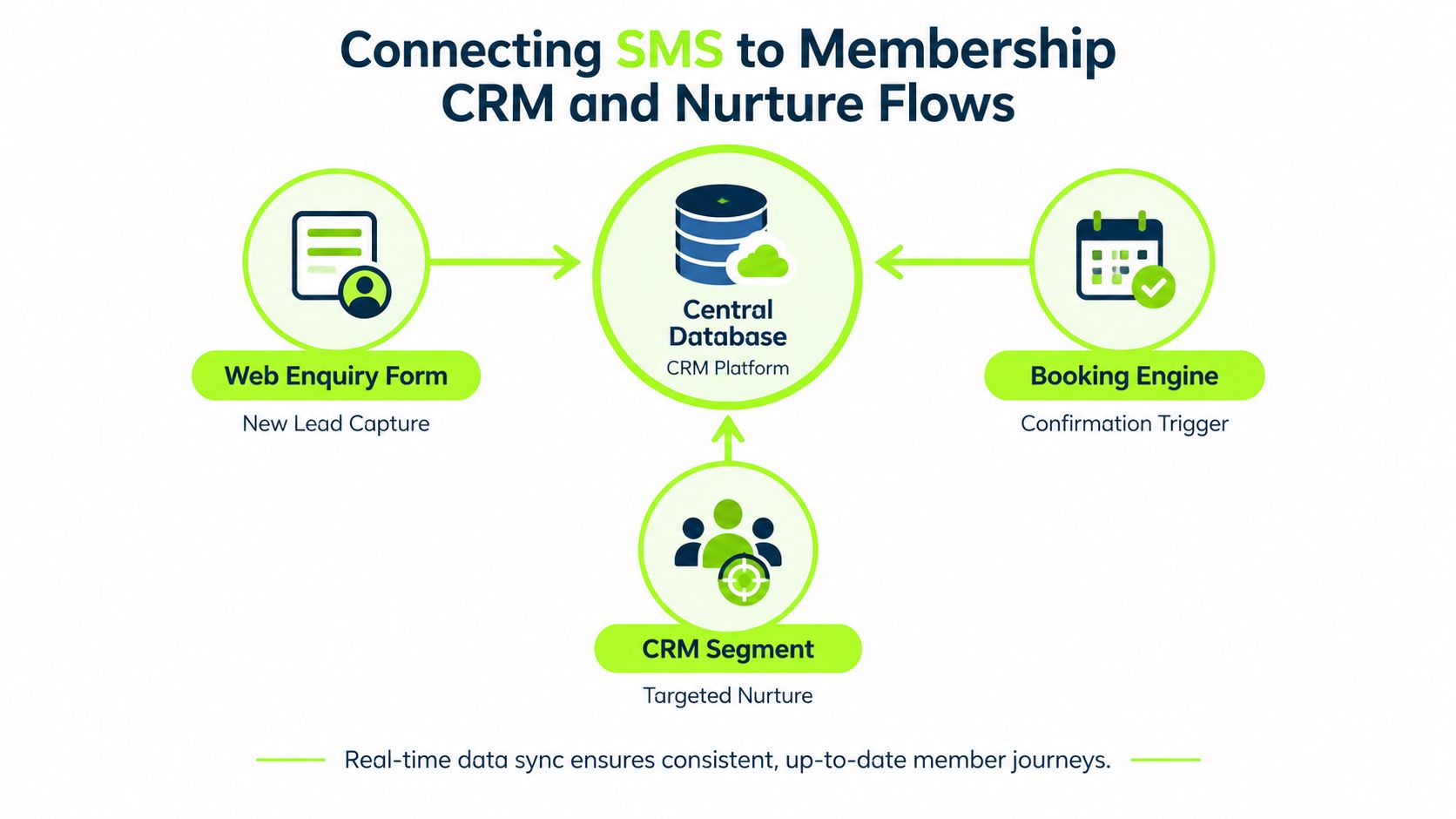
A membership journey with clear handoffs
A new prospect might receive an immediate acknowledgement if the relevant permission exists. The message should confirm receipt and offer one useful next action, such as selecting a tour time. Email can carry fuller information about membership categories, facilities and playing rights. A staff member should handle questions about price, changing membership type or personal circumstances.
If the prospect books a visit, the system should stop the enquiry nurture and begin the visit workflow. If they don't book, a later message can ask whether they want help, but it shouldn't continue indefinitely. If the prospect replies with a complex question, the system should create a task and pause the automated sequence until the owner records an outcome.
For practical background on automation flows and compliance tips, focus on the handoffs rather than the number of steps. A shorter workflow with reliable ownership is more useful than a long sequence that leaves replies unassigned.
Multi-site groups need another governance layer. Consent should be scoped to the legal entity or brand named at opt-in. A lead captured for one club shouldn't automatically receive promotional messages from another site only because both records share a database. The GolfRep guidance on CRM for golf clubs covers the wider importance of keeping commercial records, ownership and communication history connected.
Golf Club Use Cases That Justify the Channel
SMS works best when a golfer has already shown intent and the next decision is clear. These three use cases are different enough to test whether the channel adds operational value rather than duplicating email.

After an open day or taster session
The trigger is attendance at the event, not merely registration. If the attendee gave specific SMS marketing permission, send a short thank-you while the experience is still fresh. The next message should offer one clear route, such as booking a membership conversation or arranging a further visit.
If the attendee replies with a question about playing rights or membership categories, create a staff task and stop the automated flow. The system should record attendance, reply status and the eventual decision so the club can compare event activity with booked visits and applications.
Tee-time and visitor play
A confirmed booking justifies an operational reminder containing the course, date, time and practical arrival information. It shouldn't carry an unrelated promotional offer. If the golfer cancels, the booking platform can trigger a separate workflow for staff to review the released slot and, where permission exists, notify a relevant visitor segment.
SMS supports tee-sheet revenue without becoming a noisy campaign channel. The useful event is the booking state change. A generic message to every visitor in the database is much less defensible.
Post-visit membership conversion
A trial member or visitor who has used the facility but then becomes inactive may benefit from a considerate question. The trigger could be a recorded drop in usage or the end of an agreed trial period. The text should ask whether they want help, not assume that a discount is the answer.
A reply such as “I'm interested but need to understand the joining options” should move to a person. No reply should lead to a measured next step, perhaps email information or a call task, rather than an endless SMS sequence. The club should judge this workflow by attended conversations, joining decisions and opt-outs, not by how many messages it sends.
When SMS Is the Wrong Channel
SMS has value because people treat it as useful. Ofcom research cited by FireText reports that 68% of respondents considered SMS highly useful, while 67% preferred it for personal or sensitive information, as described in its summary of the Ofcom communications research. Those figures support a utility-first approach, not permission to fill every phone with promotions.
Use a simple decision rule:
- Send SMS when the message is time-sensitive, the recipient has the right permission or service relationship, and the next action is simple.
- Use email when the information needs detail, comparison or supporting documents.
- Call a person when the issue involves objections, accessibility, pricing complexity, complaint handling or emotional context.
- Send nothing when the message adds no clear value or the recipient's permission is absent or ambiguous.
Set a frequency cap before launch, even if the cap is qualitative and segment-specific. Use quiet hours that respect members, volunteers and staff routines. Older golfers may value a phone call or printed information more than another automated prompt, while some members may require accessible alternatives.
Failed delivery also needs a workflow. Mark the contact for review, avoid repeated automated attempts and give staff a clear route to verify the number through an appropriate channel.
Measure the commercial result after the message, not just the message itself. Useful outcomes include booked visits, show-up rates, joining decisions, recovered bookings and opt-outs. If a sequence produces replies but no meaningful next steps, change the workflow or retire it.
Decision test: If the recipient would reasonably ask, “Why did the club text me now?”, your trigger and wording aren't clear enough.
A Practical Roll-Out Checklist
Start with one workflow where the event, permission and commercial outcome are easy to define. A membership enquiry acknowledgement, visitor booking confirmation or open-day follow-up is a better starting point than a club-wide promotional broadcast.
Configure the foundations
- Consent capture: Add a clearly labelled SMS checkbox to enquiry, visitor, event and renewal forms. Store the source, wording, timestamp and organisation named at opt-in.
- Purpose segmentation: Separate transactional notifications from promotional journeys, and distinguish membership, visitor, event and renewal audiences.
- Suppression control: Make STOP and other withdrawal requests update one central suppression list, then test propagation into every campaign queue and integration.
- Reply ownership: Decide who receives replies during office hours, outside office hours and during staff absence. Create tasks for anything a bot shouldn't answer.
- Message discipline: Keep copy concise, remove unnecessary characters and test the final rendered message, including the personalised fields and booking link.
- Delivery records: Retain the recipient identifier, campaign purpose, consent state at send time, template version, timestamp and provider delivery result.
- Quiet-hour rules: Prevent non-essential sends at unsuitable times and define what happens when delivery fails.
GOV.UK Notify treats a message up to 160 characters as one text message, while a message up to 306 characters counts as two and one up to 459 characters counts as three. For characters outside the standard GSM set, anything longer than 70 characters can count as more than one message. Its published price for one 160-character text is 2.4 pence plus VAT, as shown on the GOV.UK Notify SMS pricing page. Use the provider's segment-aware report to understand the actual cost of each workflow.
Go-live gate: Don't approve the first campaign until consent, sender identification, opt-out handling, suppression, replies and delivery reporting have all been tested with real CRM records.
Finally, choose the KPIs before launch. For membership, report enquiries, booked visits, attended visits, applications, joins and opt-outs by workflow. For visitor golf, report confirmed bookings, attendance, cancellations and recovered opportunities. The purpose of an SMS automation system is not to create more messages. It is to make valuable decisions easier for golfers and more visible to the club team.
GolfRep helps UK golf clubs connect SMS, email, CRM records and staff follow-up into measurable acquisition, conversion and retention workflows. If you want to identify the right triggers, permissions and commercial KPIs for your club, visit GolfRep to discuss the current constraint in your pipeline.
Ready to tap into our proven growth system?