Indoor Golf SEO: A UK Guide to Local Search and Bookings

The UK golf simulator market generated USD 214.5 million in revenue in 2025, according to Grand View Research's UK golf simulator outlook. Most of that spend now starts on a phone, usually from a car park or a kitchen table, while someone decides where to hit balls for an hour.
That decision is what indoor golf SEO competes for. Not a blog post sitting at position four for a vague phrase, but the map pin, the profile, the price on the page and a booking button that works on a small screen. Venues that treat those four things as the SEO job fill bays. Venues that treat SEO as content production end up with traffic and empty slots on a Tuesday afternoon.
Indoor Golf SEO Priorities at a Glance
The first gains for most venues come from local visibility and a booking path that works on a phone, not from a new batch of articles. Most searches for somewhere to play indoor golf start on a mobile and end in one of two places: a map result or a booking page. That is where the revenue sits.
The six priorities below are ordered by how directly each one affects bookings, not by how hard it is to complete. They are the Google Business Profile, location pages, service pages, a content cluster, technical foundations and the booking path.
| Priority | Action | Why it matters | Measure to track |
|---|---|---|---|
| Google Business Profile | Complete every field, categories and booking link | Map results drive much local discovery | Profile views, calls and direction requests |
| Location pages | One unique page per venue | Matches area and near me searches | Organic sessions and bookings by page |
| Service pages | Simulator hire, lessons, corporate events, winter practice | Matches intent-specific searches | Enquiries and bookings per service |
| Content cluster | Answers to beginner and membership questions | Captures early-stage searchers | Assisted bookings and membership enquiries |
| Technical foundations | Indexable booking pages, structured data, fast mobile pages | Stops ranking and booking losses | Crawl errors and mobile page speed |
| Booking path | Book in two taps on a phone with availability visible | Turns visits into revenue | Booking conversion rate by source |
The order matters because each row fixes a different constraint. A slow booking page caps the value of every ranking above it in the table, while weak content does little harm when bays are already full from map searches. Work down the measure column until a row looks weak against the venue's own numbers, and that row is the next month of work.
If a club or an agency wants the technical side handled externally, BeatAPI's search optimization services cover that ground, though none of it substitutes for a profile and booking path the venue owns itself.
How to Set Up Your Google Business Profile for Local Search
Map results are not a secondary citation source. Ofcom data reported for May 2025 shows Google Maps reached 78% of UK online adults, up from 69% in 2023, according to Lux Branding's roundup of UK local search statistics. For a venue selling an hour in a bay, proximity, availability and price decide the click, and the profile is where those three facts live.
The checklist below is the whole job, in order.
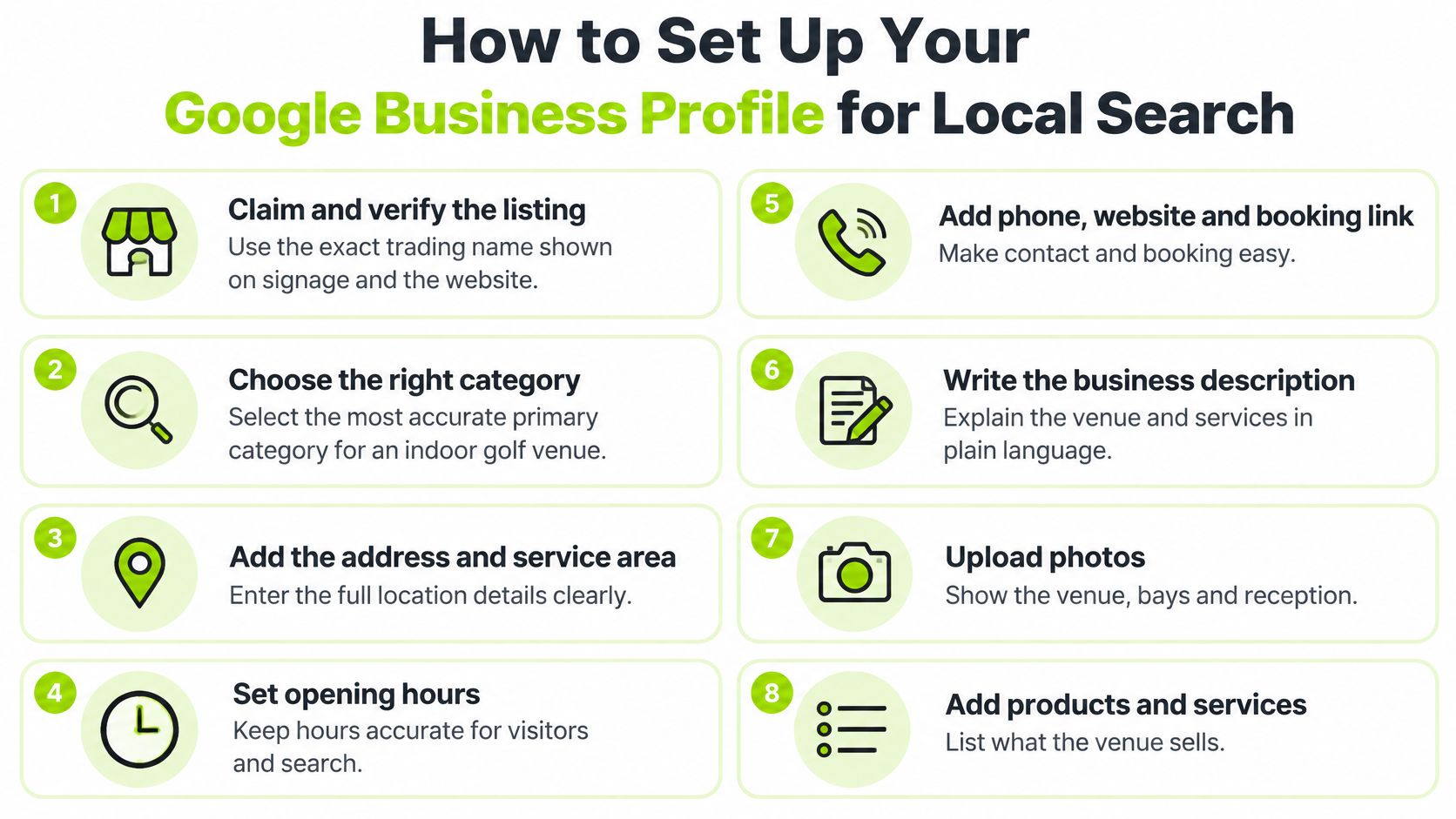
- Claim and verify under the exact trading name shown on signage and in the website header. A profile name that doesn't match the brand splits the listing's identity and confuses both customers and Google.
- Choose the primary category that describes the venue, typically indoor golf or golf simulator centre. Add secondary categories only where the venue sells that service, and never stack categories to chase impressions.
- Match the address and phone number character for character with the website and the main directories. Inconsistency here is the single most common reason a location page and a profile stop reinforcing each other.
- Enter opening hours for every day, including bank holidays, and update them the day they change. Wrong hours produce direction requests from people standing outside a locked door.
- Link the booking page, not the homepage. Every extra tap between a map result and a live availability screen costs bookings.
- Upload recent photos of the bays, the lesson area, the lounge and the exterior, and refresh them each season. Photos show whether the place looks like a sports hall or somewhere a group would book for a birthday.
- Fill the services and attributes: lessons, club hire, parking, accessibility, whether juniors are welcome.
- Ask for a review after each completed session, and reply to every one with a reference to the service that was booked.
Where profiles usually go wrong
- A keyword-stuffed business name, such as "Manchester Indoor Golf Simulator Centre", which risks suspension and looks untrustworthy.
- A generic category like sports club, which pushes the venue into results where it can't compete.
- A booking link pointing at the homepage, so the visitor has to find the diary again.
- Hours that contradict the website, which teaches customers not to trust either.
- Duplicate, unclaimed listings created by a previous owner or a booking directory.
The completion check takes ten minutes: every field filled, no hours that contradict the site, and a booking link that opens the right diary on a phone. Our guide to the golf course Google Business Profile covers the review and response side in more depth. If you want a second opinion on turning that visibility into revenue rather than rankings, The Advertising Suite's revenue-first approach to local search marketing is a useful read.
Location and Service Pages That Rank Without Duplicating
A reception desk is the last step before a bay, and the pages below it have one job: get the right person to that desk at the right time.
The structure is straightforward. One location page per venue, and one service page per product the venue sells: simulator hire, indoor lessons for beginners, indoor lessons for returning golfers, corporate golf events, winter practice and group bookings.
What each location page needs
- Full address plus how to arrive by car, rail and bus.
- Parking, including what happens on a match day if the venue shares a site.
- Bay count and the simulator system, named.
- Session lengths and opening hours.
- Reviews that mention that venue specifically.
- A map and a booking button within thumb reach on a phone.
Now the test that separates a real location page from a template. Say you run a Manchester venue with six bays, a small car park and a ten-minute walk from a station, and a Bristol venue with four bays, no parking and a bus stop outside. If both pages carry the same paragraph about state-of-the-art simulators and a warm welcome, neither tells a searcher or a search engine anything useful. The Manchester page should state the six bays, the launch monitor, the car park and the station. The Bristol page should state the four bays, the missing car park, the bus route and what's within walking distance.
Rule of thumb: if the page would still read sensibly with another town name pasted in, it isn't a location page yet.
Duplicated local copy weakens relevance and makes one venue indistinguishable from another to search engines, so write each page from that venue's own facts. Link each service page to its nearest location page, and don't build pages for towns the venue doesn't serve. If two pages start chasing the same query, detect cannibalized keywords with GSC data before rewriting either one.
Structured data helps where it's eligible, particularly LocalBusiness and SportsActivityLocation, but it must describe text a visitor can see. Marking up a price or a facility the page doesn't show is a good way to have the markup ignored. Before publishing, check that the page names the venue, the area, the bays, the system, the price logic and the booking step, and that the booking button works from a phone.
Content That Answers Beginner and Membership Questions
Indoor golf isn't a variant of course-golf search demand. BBC reporting citing England Golf data states that visits to driving ranges and simulators are as numerous as visits to nine- or 18-hole courses, and that 36% of people in England played simulated or other alternative golf before experiencing a course, as reported in BBC Sport's coverage of alternative golf formats. That's a discovery pathway, and it runs through pages most venues haven't written.
The audience is wider still. England Golf reported that more than one in four adults in England played some form of golf, including off-course and driving-range activity, per England Golf's participation reporting. Many of those people won't describe themselves as club golfers, which is exactly why one "indoor golf" page can't serve them all.
Group the questions by intent
- The complete beginner, asking whether a simulator is a sensible place to learn. Page title: "can a simulator help me learn golf?" Next step: a taster session.
- The practice player, comparing launch monitor numbers and wanting to know how accurate they are. Next step: a bay booking with a data readout.
- The coaching client, looking for lessons indoors during winter. Next step: a swing assessment.
- The competitive player, asking whether leagues suit their standard. Next step: league sign-up with format and commitment explained.
- The social group, planning an evening around famous holes rather than a full round. Next step: a group booking with food and drink options.
Each page should match the reason the session happens. Plenty of simulator visits aren't simulated rounds at all: players come to read numbers, take a lesson or play a famous hole with friends, and a page written for a full 18-hole round misses them.
The comparison most venues never publish
Membership is where indoor golf SEO usually stops. A player considering regular play wants to compare a pay-and-play habit with a membership, and the arithmetic comes from the venue's own prices. Say off-peak hours cost £20 and membership is £69 a month including four off-peak hours, with extras at £18 for members. Six off-peak hours a month costs £120 pay-and-play, or £69 plus £36 for the two extra hours, so £105. The break-even sits exactly where the venue's price list puts it, and a simple calculator makes that obvious in ten seconds.
Ask the questions the market is searching: is an indoor golf membership worth it, what does simulator golf cost after work, can I book a recurring bay for winter, what happens if bad weather cancels outdoor golf. Answer with peak and off-peak prices, league formats, cancellation terms, accessibility and the best times to book.
Keep the linking tight. Every informational page links to one relevant service or location page, and the pillar page links down to the narrower questions.
Turning Search Visits Into Bookings and Memberships
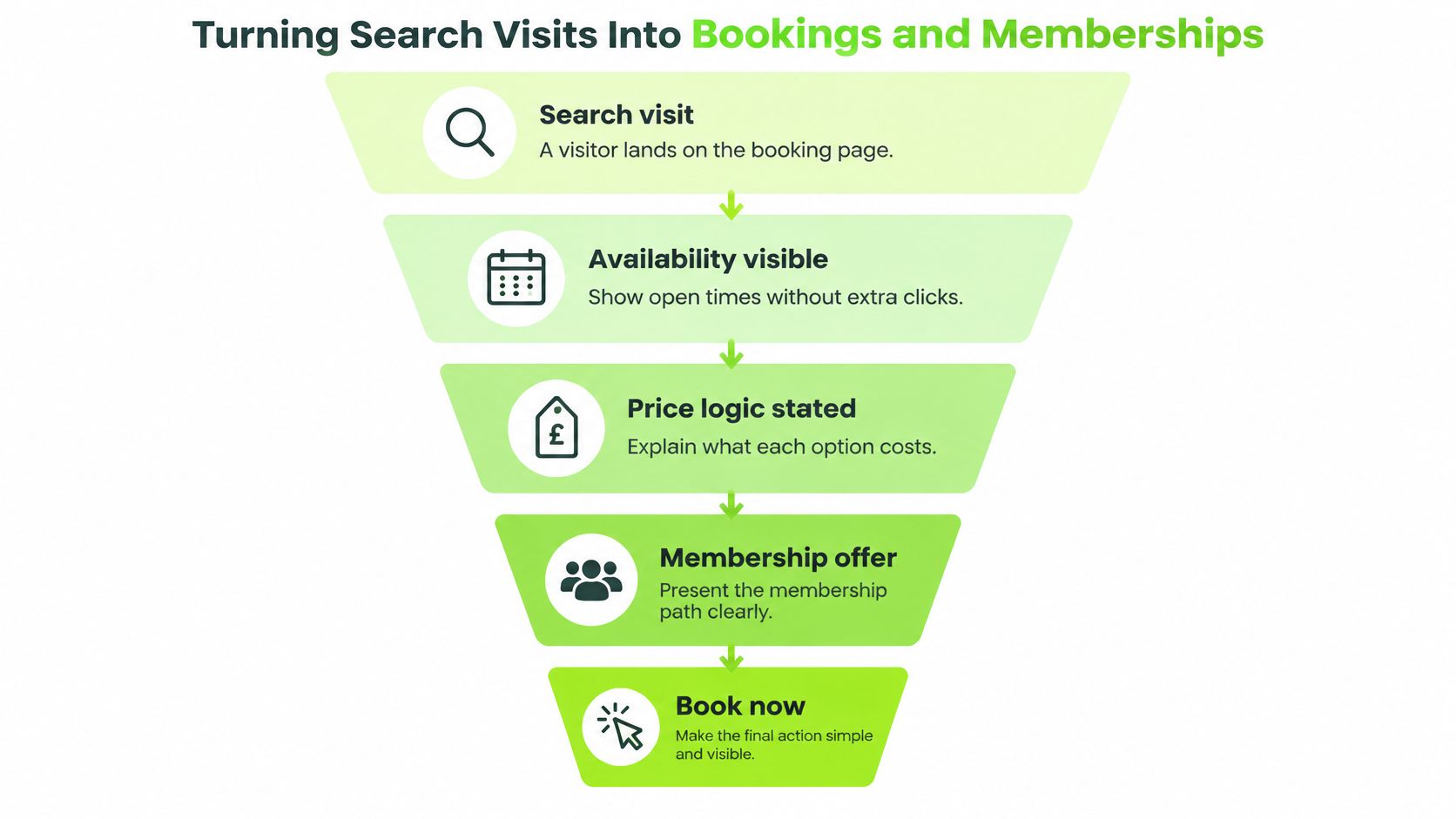
A booking page that loses half its visitors doubles the cost of every ranking it earns. Treat the path from search result to confirmed bay as part of the SEO work itself, and measure it in bookings and memberships rather than positions.
Four checks on every booking page cover most of the loss: availability visible without extra clicks, price logic stated on the page, a booking button above the fold on mobile, and a flow that asks only for the information needed to hold the bay. Fix whichever of the four fails first. That is the constraint limiting revenue, and the other three cannot compensate for it.
Tracking comes next, and it's unglamorous work. Tag booking links with UTM parameters, fire events on calls, direction requests and booking clicks, and connect the booking system to analytics so a completed booking can be traced back to organic search. Without that connection, the venue is guessing.
A worked example shows why page-level numbers matter. If 300 organic visits reach the simulator hire page in a month and 12 bookings follow, the conversion rate is 4%. That figure belongs against that page, not averaged across the whole site, where a strong homepage hides a weak service page. The same page-level view guides spend: a page converting well justifies more content and links pointing at it, while a page converting poorly needs its booking flow fixed before anything else is built on top.
Practical rule: if the booking system can't say which page a booking came from, fix that before commissioning another article.
Membership needs a step between first visit and enquiry. Put a taster session or assessment in that gap, and record the source in the CRM so the venue can see which pages start membership conversations. Recurring use is the clearest commercial signal. Memberships, leagues and repeat bay bookings all leave a trail in the booking system, and tracing that trail back to the first organic visit shows which pages produce regulars rather than one-off sessions.
| Stage | Metric | Where to find it | What it tells you |
|---|---|---|---|
| Discovery | Map views and search impressions | Google Business Profile insights | Whether local search is reaching the venue |
| Interest | Organic sessions per location and service page | Web analytics | Which pages attract the right visitors |
| Action | Calls, direction requests and booking clicks | Profile insights and analytics events | Whether visitors take a next step |
| Booking | Completed bookings by source | Booking system with UTM tags | How much revenue organic search produces |
| Membership | Trial or membership enquiries from organic | CRM | Whether visits lead to membership conversations |
| Repeat use | Repeat bookings and league entries by source | Booking system | Whether first visits become regular customers |
Read the table as a diagnostic order. Work top to bottom, find the first stage where the numbers drop away, and fix that stage before spending on the ones above it. A venue with strong map impressions and weak booking clicks has a booking-path problem, and publishing more content will not solve it. For what happens between a first booking and a second visit, our breakdown of golf simulator lead generation covers the follow-up side.
Technical Foundations to Check Before You Publish
Technical faults rarely win rankings on their own, but they can prevent good pages from being found or booked. Seven checks, in the order that usually finds a problem:
- Indexability. Every location, service and booking page should return a normal page, appear in the sitemap and be reachable without a login. Pages inside embedded frames the crawler can't read are the classic failure here. Owner: whoever built the site.
- The booking widget on a phone. It should load without blocking the rest of the page. If it does block, lazy-load it or link straight out to the booking system. Owner: booking provider and developer together.
- Mobile page speed on location and booking pages. Compress the heaviest images first, then worry about scripts. A venue photo shot on a phone can easily outweigh the rest of the page.
- Name, address and phone consistency across the website, the profile and the key directories, including whether you write Ltd or Limited, Street or St.
- Structured data for LocalBusiness, SportsActivityLocation, Event, Offer and FAQ where eligible, checked against the text visible on the page.
- Duplicate pages removed or redirected, such as the same service page reachable at two addresses.
- A submitted sitemap and no broken links into the booking system, which is the link that matters most.
A pass on all seven doesn't guarantee rankings. It does mean the content and the booking path aren't being undermined by something invisible. Our notes on golf club website design cover the wider structure that supports these checks.
Confirm Your Bottleneck Before You Spend More
Four constraints explain most underperformance, and each has its own symptom. Low map visibility shows up as few profile views and calls, so the profile and location pages come first. Strong organic traffic with few bookings points at the booking path. Bookings without membership enquiries or repeat use points at the membership journey and follow-up. Good repeat use with weak revenue points at pricing and off-peak utilisation.
Each constraint reads through a different number. Visibility shows in profile views and calls, the booking path in completed reservations, the membership journey in enquiries and sign-ups, and pricing in revenue per booked slot. Working on the wrong one spends budget without moving revenue, which is why the order of work matters more than the volume of it.
Decision rule: pick one bottleneck, change one thing, leave it 30 days, then read the metric before touching anything else.
The reporting changes as the work matures. GolfRep's process focuses on response speed, visibility and booked visits in month one, then source quality, conversion consistency and retention by month twelve. That keeps attention on the constraint rather than on a monthly ranking report nobody acts on.
For clubs that need demand alongside conversion, GolfRep helps implement a structured pipeline strategy to bring in new members year round and expand the database with targeted advertising and nurture automation.
A venue that can name its constraint, fix it and show the movement in booked bays is doing more with SEO than most of its competitors will manage this year.
If you'd like to know which constraint is limiting your club, whether that's local visibility, the booking path or the step from first visit to membership, GolfRep works with golf clubs and golf brands to build the full path from local search to booked visits and recurring membership revenue. Contact the team through the Contact Us page to start the conversation.
Ready to tap into our proven growth system?