Golf Course Google Business Profile: Setup Guide for 2026
A visitor searches on Saturday morning, finds your club, and gets last winter's opening hours, a pin at the bottom of the lane and a phone number nobody answers. They don't complain. They book somewhere else. Your golf course Google Business Profile works like a booking page before anyone reaches your website, so every field needs to match the visitor, member and society journeys you sell.
How to Claim and Verify Your Golf Course Listing
Start by checking whether you already have a listing. Duplicate profiles are the most common avoidable problem, often because a general manager and a PGA professional have each created one separately. Reviews then split, details drift, and visitors can't tell which entry is current.
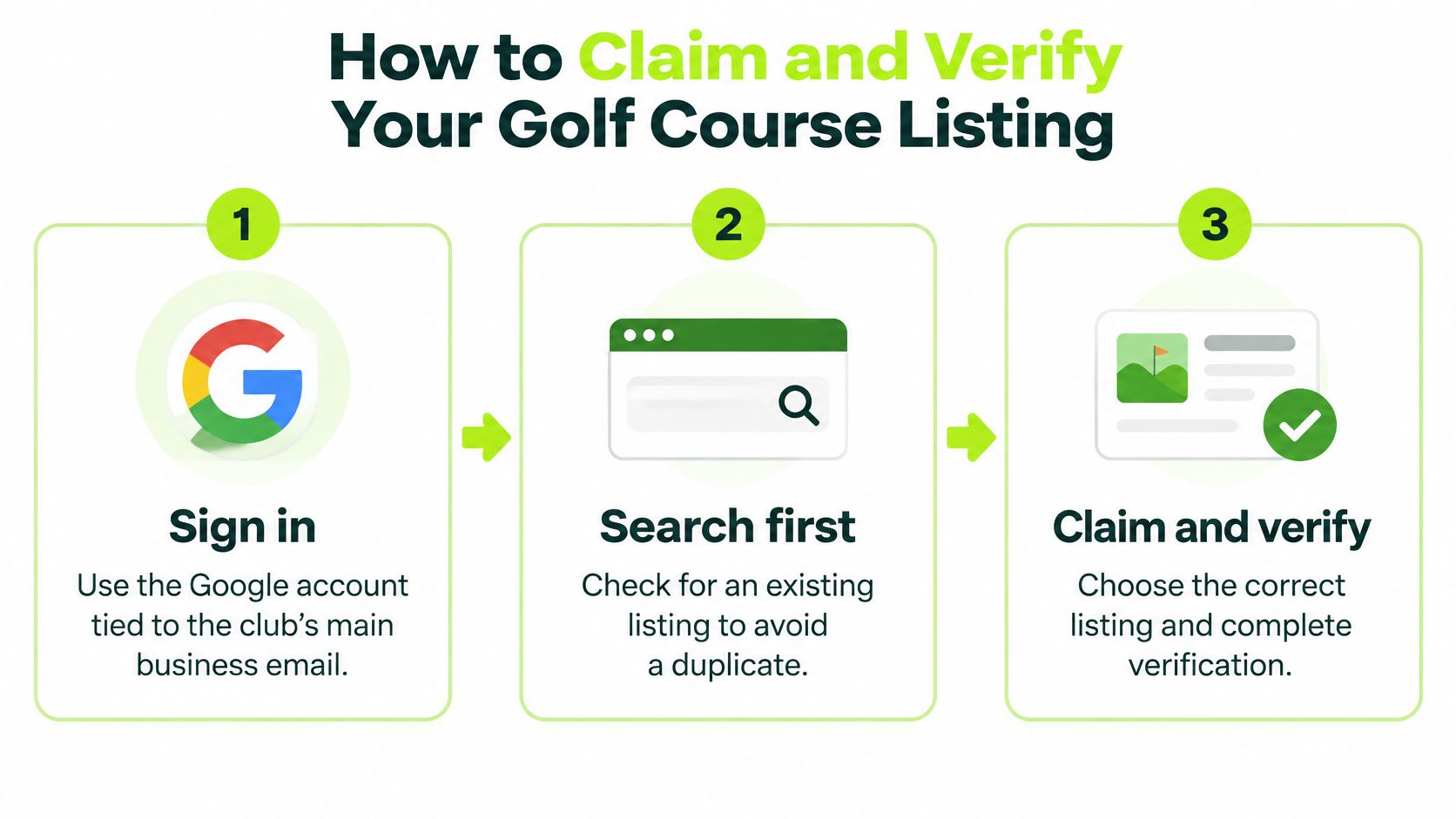
Claim in a sensible order
- Sign in with the club account. Use the Google account tied to the club's main business email, not a personal address. That keeps control with the club if a member of staff leaves.
- Search first. Look for the club name exactly as golfers would type it, including any older trading name. If a listing exists, claim that one rather than building another.
- Claim and verify. Choose the verification method Google offers for your location, usually a postcard to the club address or a phone call. If you need the practical steps explained in one place, complete your Google profile verification before you start editing fields, and allow time for a code to arrive.
Check eligibility before you spend time on wording. According to Google's eligibility and representation guidance, Google permits profiles for businesses with a physical location where customers can visit during stated hours and make in-person contact. That means your profile should represent the actual customer-facing operation, whether that's the course, clubhouse, range, simulator venue or reception. An administrative office away from the course doesn't qualify on its own.
Fix the details a first-time visitor relies on
- Address and pin: Enter the address exactly as it appears at the entrance visitors use. Then drag the map pin to the clubhouse or reception, not the middle of the road or a fairway.
- Access rights: Add a second manager, such as the club secretary or PGA professional. One named owner alone creates delay when that person is on holiday or leaves.
- Club record: Note the verification date, account owner and login holder in a shared document. Committees change, and nobody should be hunting for access in April.
Practical test: Audit the profile as a first-time visitor would, from the entrance, reception and parking arrangements, before you think about visibility.
An inaccurate address risks rejection or suspension, and it also fails commercially. Golfers using Google Maps need reliable directions for tee times, society days, lessons and functions. A verified profile at the end of this process looks simple: confirmed address, correct hours, the right pin and at least two people who can manage it.
Choosing Categories for Each Type of Golf Business
Your primary category tells Google and your visitors what you mainly sell. Choose it first, on its own, before you add anything else. According to Google's category guidance, businesses should use as few categories as possible and select the most specific category that represents the core business.
That point matters because Google's own example says selecting "Golf Resort" can implicitly cover broader classifications such as "Resort Hotel," "Hotel," and "Golf Course." Stacking every golf-related label doesn't capture more useful searches. It creates ambiguity and sets expectations you may not meet.
Where clubs usually get this wrong
The members' club is the most common mismatch. If you're mainly selling membership and course access, lead with that proposition. Don't use a broad resort label that implies hotel rooms you don't offer, however attractive the search volume looks.
For background on how Google structures these choices, the guide to choosing Google Business Profile categories is a useful companion while you work through the table below.
Primary and secondary categories by operating model
| Operating model | Primary category | Secondary categories | Services to list |
|---|---|---|---|
| Members' club with some visitor access | Golf Club | Restaurant or events only if these are a major offer | Membership, visitor tee times, societies |
| Public pay-and-play course | Golf Course | Restaurant or pro shop only if sizeable | Pay-and-play rounds, lessons, junior sessions |
| Resort course attached to a hotel | Golf Resort | Hotel only if rooms are bookable through the profile | Hotel stays, golf packages, function hire |
| Indoor golf or simulator venue | Closest match in Google's current list | Coaching or food and beverage if sizeable | Bay hire, memberships, leagues |
| Multi-site operator | Primary set per venue from its own model, not one label for the group | Secondaries only for a sizeable offer at that venue | That venue's own services, not a group-wide list |
Read each row as a commercial decision, not a labelling exercise. A pay-and-play course lives on casual rounds and lessons, so Golf Course fits better than a members' club label. A hotel-led venue can use Golf Resort, but only because stays and packages are central to what guests buy. An indoor venue should pick the closest current match, then let services such as bay hire and leagues do the precise work.
The rule for secondaries and multi-site groups
Add a secondary category only when it describes a sizeable part of the business, such as a restaurant or function rooms that trade in their own right. Remove token add-ons. They invite the wrong enquiry and disappoint people on arrival.
If you operate several venues, map each site's real offer first, then repeat the audit per venue. Don't copy one structure across the group, because a members' club and a pay-and-play course under the same owner may need different primaries. Audit again whenever the operating model changes.
Finish with one question. If a visitor read only the category, would they expect the thing you sell? If not, change the category, not the visitor.
Profile Fields to Complete Before Anything Else
Say an April visitor finds winter hours, assumes the course opens late, and books a competitor's early tee instead. That's the pattern here. Most listings lose trade on a few basic errors, not on missing advanced features.
Work through the fields in one sitting. If you want a wider sense-check while you do it, the Google Business Profile advice for business owners covers the same hygiene points from a general business view. Then apply the golf specifics below.
Profile fields, what to enter and common errors
| Profile field | What to enter | Common error |
|---|---|---|
| Business name | Name as shown on the entrance sign, with no keyword add-ons | Stuffing phrases such as best golf near me into the name |
| Address | Exact address of the entrance visitors use | Pin on the town centre or an office the public cannot visit |
| Phone | Main line answered during opening hours | Tracking or forwarding number that goes unanswered |
| Website | Page matching the search, such as visitor tee times or membership | Homepage only, forcing visitors to hunt |
| Opening hours | Seasonal hours, winter closures and special dates | Winter timetable still showing in spring |
| Services | One entry per offer. Visitor golf, membership, junior, lessons, societies, functions | One generic golf entry that says nothing specific |
| Attributes | Parking, dress code, pay-and-play access, handicap requirement | Left blank, so prospects arrive unqualified |
| Booking link | Direct link to the tee sheet or enquiry form | Link to a general contact page |
Match each journey to its own route
- The visitor: Needs a visitor golf service, current seasonal hours and a link straight to the tee sheet.
- The prospective member: Needs a membership service and a link to the joining page, not the homepage.
- The society organiser: Needs a societies service, any minimum number or deposit stated in plain words, and a link to the organiser form.
If you don't sell one of those journeys, leave that service and link off entirely. A private club that doesn't want casual green fee traffic should not promise it by accident. Finish by noting every field that differs from what the club really offers today, and fix those first.
Photos and Descriptions That Answer Visitor Questions
Standing in an unfamiliar car park, a visitor asks simple questions. Is this the right entrance? Where do I check in? Does the clubhouse look like the website promised? Your photos should answer those questions before the golfer has to ask anyone.
Use Google's standards as your checklist
According to Google's photo guidance for Business Profiles, photos should be in focus, well lit and representative of reality, in JPG or PNG files between 10 KB and 5 MB, with a recommended resolution of 720 by 720 pixels and a minimum of 250 by 250 pixels. That rules out heavily filtered images and old brochure shots of facilities you've since replaced.
- Exterior set: Add at least three photos taken from the directions customers approach from. For a course, that's the entrance signage, clubhouse frontage and car park approach.
- Interior set: Add at least three more showing reception, the bar, changing facilities or the simulator room, provided they reflect what visitors will find.
- Refresh rhythm: Add photos and videos regularly, including course condition images from greenkeeping and a shot from a current winter competition.
This works best when the profile and site tell the same story, which is why it's worth aligning images with your golf club website design rather than treating Google as a separate gallery. A golfer who sees the same check-in desk in both places arrives more confident.
Write descriptions that filter as well as attract
Use plain English that names the offer, the audience and any access rules. Avoid superlatives you can't prove. "Finest course in the county" tells a visitor nothing they can act on.
Specific copy does useful commercial work. A members' club might state that visitors need a current handicap certificate and must book ahead at weekends. That saves a phone call, filters unsuitable enquiries, and protects the experience of members who've paid for access.
Replace any image older than the facilities it shows. An honest photo of a modest, tidy clubhouse converts better than a flattering photo of one that no longer exists.
Make one decision this month. Photograph three sets, the entrance, the check-in point and the clubhouse, during normal trading. Upload them, then check your description answers who can play, when, and under what conditions.
Managing Reviews and Seasonal Changes Without Losing Trust
A society organiser checks the listing on a Thursday night, two days before a winter fixture. The latest review mentions a frost delay and a closed halfway hut. If the hours still show a summer close, and nobody has replied, that organiser books elsewhere. Reviews and seasonal notes sit on the same page as the route to a tee time, so visitors read them as part of the offer.
According to UK local search benchmarks from RankCraft, 83% of consumers use Google to read local-business reviews, and consumers are 2.7 times more likely to consider a business reputable when its profile is complete. More golfers now compare clubs before they commit. A public reply shows them how the club will treat them on the day.
A routine you can keep in season
- Ask after real contact: Request reviews after verified visits or completed enquiries, never in bulk and never with an incentive attached.
- Reply to every review: Use specific, non-repetitive wording that refers to what the reviewer mentioned.
- Handle criticism calmly: For complaints about closures, slow pace of play or renovation, acknowledge the issue, state what's changed, and don't argue.
Our guidance on golf club Google reviews goes further on reply wording. The habit matters more than perfect phrasing. An unanswered negative review looks like indifference. A short, factual reply looks like a club that notices.
Fewer, more candid reviews can be worth more than a large pile of generic praise. I would rather see comments that help a visitor, member or society organiser self-qualify on access, dress code, handicap requirements and parking. Chasing volume alone brings mismatched enquiries staff then spend time turning away.
One owner for seasonal truth
Give one person ownership of updates covering opening hours, temporary course closures, winter rules, frost delays, visitor restrictions, competitions and greenkeeping work. Seasonal change is an operations task, published where people decide whether to book.
Decision rule: If a review or a seasonal update has sat unanswered for a week during the season, treat it as a missed task in the weekly operations check.
Say you're closing a nine hole loop for drainage work. Post a dated notice, update the hours and service notes, and reply promptly to any visitor who arrived unaware. That sequence costs minutes. Leaving it costs a string of one star reviews from people who feel misled, and those stay visible long after the drains are finished.
Measuring Profile Actions Against Bookings and Enquiries
A society organiser searches "golf club near me," opens the listing, taps directions, and never reaches a tee time. That path is a booking attempt that stopped on the profile. Read it before you treat a rise in rank as progress. Rank does not pay greenkeeping bills. Calls, website visits, direction requests and bookings do, and Google reports those stages separately.
According to Google's official performance documentation, profile metrics include the search terms used to discover a business, views generated through Search and Maps, and customer actions such as website visits, calls, messages and direction requests. Those actions deserve the same attention as any other enquiry source, because they are the steps between finding the club and joining or booking.
Profile metrics, what they show and the action they prompt
| Metric | What it shows | Action to consider |
|---|---|---|
| Search terms | Phrases that led people to the listing | Add a genuinely offered service the terms reveal |
| Views in Search and Maps | Visibility trend over time | Compare with the same month last year |
| Website clicks | Visitors moving from the profile to the site | Check the landing page matches the search |
| Calls | Visitors choosing to phone | Confirm the line is answered in opening hours |
| Direction requests | Visitors heading to the venue | If high but bookings flat, check the booking link |
| Booking or enquiry clicks | Intent to book or join | Tag the source in the CRM and review monthly |
What to do with each number
Search terms are the most useful row. If golfers arrive through pay and play phrases and the profile only mentions membership, add that service, provided you offer it. High intent phrases such as "golf club near me," "golf lessons" or "wedding venue golf club" show which journey local demand is already taking: a casual round, a lesson, or a function booking.
Direction requests need a second look next to bookings. A rise in directions with flat bookings can mean the booking link is hard to find on a phone, or the tee sheet is full at the times people want. Those are different problems. The metric will not tell you which one you have, so open the listing as a visitor would and check the diary for those hours.
Build a simple monthly note comparing each metric with the same month last year. Golf demand is seasonal, so a January dip is not a crisis. Tag the source in your booking or CRM system, as described in our conversion tracking setup guidance, and ask callers how they found the club.
Change one thing at a time, measure the next month, and keep the change only if the action count moves. That is slower than rewriting the whole profile, and it is how you learn which field sent a visitor toward a booking.
Confirm Your Profile Before the Next Season
Time your final check to the demand spike, not to a quiet week in January. Golf News reporting on England participation notes that World Handicap System score submissions in March 2025 were almost twice the level of March 2024, and April submissions rose 98% year on year. A listing still showing winter hours will be the version golfers see when searches jump.
Four pre-season checks
- Name one owner, usually the secretary or commercial manager, who can edit hours, closures and replies without waiting for a committee.
- Block an hour two weeks before the first busy weekend and compare the live profile with the course diary, covering frost policy, visitor restrictions, greenkeeping closures and the booking link.
- Record a baseline of views, calls, direction requests and booking clicks for that month.
- Leave category, photos and service copy unchanged unless the diary shows the offer itself has changed.
That hour is about accuracy, not reinvention. The profile should match the course a first-time visitor will find, before March traffic arrives.
GolfRep serves UK golf courses and brands, helping clubs improve acquisition, conversion and retention with data-led campaigns and structured follow-up, so if you'd like your profile activity connected properly to bookings and membership enquiries, visit GolfRep to see how we work.
Ready to tap into our proven growth system?