Golf Club Website Conversion: Five Journeys That Matter
Approximately 3.91 million adults in England played golf in some form in 2024, alongside 790,728 registered golfers and 658,852 affiliated golfers, according to The R&A's Global Golf Participation report. That's a substantial audience beyond the existing membership base. The commercial question is whether your website gives each type of golfer a useful next step, and whether you can tell when they take it.
Why Website Conversion Decides Club Revenue
Steady website traffic doesn't tell a general manager whether the website is doing its job. A seasonal social campaign might increase visits while membership applications remain flat. That could mean the campaign attracted unsuitable golfers, the membership page didn't answer their questions, or the application process was difficult. Traffic alone won't distinguish between them.
Conversion is the share of visitors who take a useful next step. That might be booking a tee time, submitting a membership enquiry, requesting a society date or arranging a taster visit. The useful action changes with the visitor's intention.
A club website is often the first place someone checks whether the club suits them. A visiting golfer wants availability and a green fee. A prospective member wants to understand eligibility, playing access and joining costs. Giving both people the same general contact button makes the club harder to buy from.
Judge progress, not activity
At GolfRep, we treat golf club website conversion as a set of commercial journeys rather than a single website score. Each journey needs an identifiable starting point, a clear action and a recorded outcome.
The wider growth process runs through attract, nurture, convert and retain. Operationally, that means attracting someone, helping them land on the right page, enabling action, following through and giving them a reason to return. The website does most of its work at the landing and action stages, but its results need to connect to what happens afterwards.
For practical ways to assess whether someone understands a landing page, the conversion insights from Uxia provide a useful usability-testing resource. Apply that approach to real club tasks, not whether people like the design.
Commercial test: Can someone understand the offer, find the next step and complete it without asking a member of staff for help?
Start by mapping the journeys your club sells through. Measure where people progress and where they stop, then identify the weakest stage before commissioning changes.
The Five Visitor Journeys Your Site Must Serve
Rank your website journeys by the annual revenue they support before deciding which pages deserve attention. A visitor-led club with spare weekday capacity has different priorities from a private club managing a membership waiting list. A clubhouse with substantial function business needs more than an attractive golf homepage.
Visitor journeys, conversion actions and metrics
| Visitor group | Intent on arrival | Conversion action | Metric to track |
|---|---|---|---|
| Visiting golfer | Book a round this week | Tee-time booking | Tee-time booking rate, bookings per tee-sheet visitor |
| Membership prospect | Compare joining options | Enquiry or application | Enquiry rate on membership pages |
| Society organiser | Find a date and a package | Date request or deposit | Date-request rate and request-to-deposit conversion |
| Event or function enquirer | Check space and catering | Event enquiry form | Enquiries per month |
| Lapsed or local golfer | Return to the club | Account reactivation or booking | Repeat booking rate |
These measures aren't interchangeable. An event enquiry starts a conversation about availability, catering and suitability. A tee-time booking should normally complete a transaction. Combining them into a general total of website conversions hides the difference between a request and a sale.
Build the map from actual arrivals
Pull the last twelve months of landing-page information, where available, and group pages by visitor intention. Use booking records, enquiry records and staff knowledge to fill gaps where analytics aren't available.
- Group related pages. Membership categories, fees and joining information belong to the membership journey.
- Choose a primary action. Decide whether each page should produce a booking, enquiry, application or date request.
- Record the destination. Note whether the action finishes on your website, an external booking engine or a staff-managed process.
- Assign an owner. Someone must be responsible for checking that the journey works and reporting its outcome.
Say a golfer arrives on Thursday evening looking for a Saturday tee time. They need a direct route to available times, not a membership brochure or a slideshow of clubhouse photographs. The page should respect that immediate intention.
Society and event demand can also disappear into a generic contact form. Without a recorded enquiry type, the manager can't easily separate a society opportunity from a lost-property question.
Choose the two journeys with the greatest revenue importance this year. Use expected contribution and available capacity alongside gross revenue, so you don't prioritise demand the club can't profitably accommodate.
Measuring Conversion by Source and Stage
In Albatross's census of 2,086 UK golf-club websites, 89% had a membership page, yet only 36% of those pages contained an enquiry form, and 50% of sites showed no Google Analytics or Google Tag Manager code. Missing tags prove nothing on their own, but they make checking tracking the first job.
Each of the five journeys earns its own conversion line. A tee-time booking finishes on the site within minutes; a membership enquiry can run for weeks and several conversations before it becomes revenue. A single blended figure lets a healthy booking journey hide a leaking membership pipeline.
Set a baseline for every stage before touching layouts. A redesign approved without one leaves the manager guessing whether enquiries, bookings or revenue moved.
Conversion events and what each one answers
| Stage | Event to track | Tool or data source | Question it answers |
|---|---|---|---|
| Landing page view | Membership and tee-time page views | GA4 or equivalent | Which pages attract prospects? |
| Form start | First field completed on the enquiry form | GA4 form events | Where do prospects abandon? |
| Submission | Completed enquiry or booking | GA4 plus a CRM source field | Which campaigns produce enquiries? |
| Visit booked | Taster visit or open day booked | CRM offline import | Which enquiries become visits? |
| Join | Membership sale recorded against source | CRM offline import | What are revenue and cost per join by source? |
Connect the records
Use GA4 or an equivalent analytics system, consistent UTM campaign labels, successful-submission events and a source field in the CRM. Where telephone enquiries carry real revenue, treat call tracking as part of the setup rather than an extra. Pull booked visits and membership sales back into reporting through offline imports or a reconciled dataset, so each sale sits against the source that produced it.
A button click is not a completed booking. Test the confirmation event, and check an external booking engine preserves attribution rather than surfacing as an unexplained new source.
The maths is simple once the records connect: a £1,000 campaign producing four joins costs £250 per join. Break the link between membership record and original campaign, and that figure collapses into guesswork.
Our conversion tracking setup guide covers the practical configuration. Clubs selling function and event space face the same attribution question on that journey; Express Text's guide to filling rooms with data shows how to organise that tracking around commercial outcomes.
Keep event names consistent across pages. A form submission should mean a successful submission everywhere, not a mixture of clicks, attempts and completed enquiries.
Hold each stage to at least 90 days of data before judging it, longer where volumes are small. Compare stage-by-stage conversion, speed-to-lead, visit-to-join performance, source-level revenue and early retention side by side. Respect consent settings, and keep personal details out of analytics event labels.
Turning Tee-Time Visitors Into Paying Golfers
An average of 15,438 online tee-sheet users multiplied by a 10% booking rate implies roughly 1,544 bookings, using the UK and Ireland figures in The Revenue Club's visitor golf market overview. The same overview reported average annual casual green-fee income of £163,952, with 65% online and 35% through offline channels, including telephone and walk-in sales.
Tee-time booking worked example
| Stage | Figure | What it tells you |
|---|---|---|
| Users visiting the online tee sheet | 15,438 | Average over 12 months across UK and Ireland clubs |
| Online booking conversion rate | 10% | Average share of tee-sheet visitors who book |
| Implied online bookings | Roughly 1,544 | Before price, cancellation or repeat-visit effects |
| Online share of casual green-fee income | 65% | The remaining 35% comes through phone and walk-in sales |
Treat this as a worked benchmark, not a forecast for your club. A booking isn't necessarily a single golfer, and booking value changes with party size, price and extras.
Remove obstacles before buying more visits
- Show the next available times on the homepage. Use a live feed where the booking system supports it. Don't display static availability that staff must continually correct.
- Put a book-a-round button above the fold. Check desktop and mobile layouts so visitors don't need to scroll to discover whether online booking exists.
- Explain the green fee before time selection. State what's included and make relevant restrictions visible before checkout.
- Remove compulsory account creation where possible. Offer guest booking if supported. If the platform requires an account, let golfers see availability and price first, and explain why registration is necessary.
- Track the complete booking path. Record tee-sheet entry, selection, checkout and confirmation so you can locate abandonment.
A 2026 census conducted by golf-website provider Albatross found 74% of 2,086 UK club websites offered online visitor booking, with BRS, intelligentgolf and Club Systems powering 83% of those booking sites. It's a commercial provider's census rather than an independent government survey, but it establishes useful platform context.
A familiar booking engine won't compensate for an obscure route into it. Keep the club-to-platform handover clear, while retaining a visible telephone option for golfers who need assistance.
This week, multiply your own tee-sheet visitors by your measured booking rate. Reconcile the result against completed online bookings, investigating differences in date ranges, cancelled transactions and tracking coverage before judging page performance.
Mobile Pages and Forms That Hold Attention
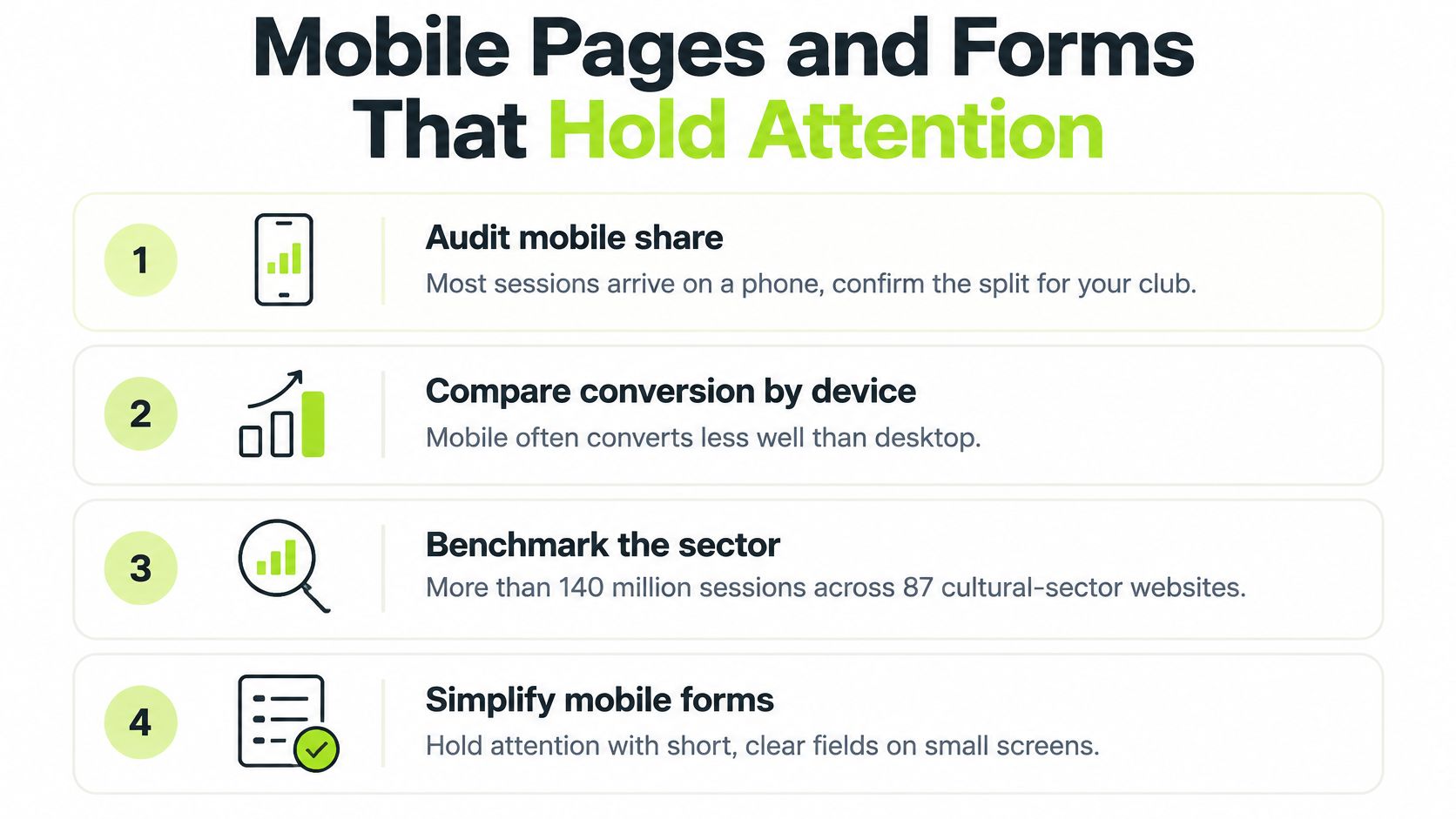
Mobile accounted for 69.5% of sessions but converted at 2.24%, against 4.24% on desktop, in a benchmark covering more than 140 million sessions across 87 cultural-sector websites, described by Media House. Mobile basket abandonment was 49.49%, compared with 40.75% on desktop. These are leisure-sector figures, not golf-club targets, but they justify testing device performance separately.
On a golf website, the obstacle might be a membership pricing table that spills off the screen or a long form that's awkward to complete on a train. A desktop demonstration in the committee room won't reveal that experience.
Run an actual phone test
Use common phones to view membership options, submit an enquiry and complete a test tee-time booking. Time the journeys, note mistakes and check the confirmation messages.
- Make contact straightforward. Provide a click-to-call option without covering the main booking button.
- Reduce typing. Use autofill-compatible fields and ask for postcode or preferred visit date only when they help staff progress the enquiry.
- Reduce page weight. Compress course photography, size images correctly and test performance against Core Web Vitals.
- Check accessibility. Use readable contrast, visible field labels, useful error messages and controls that work with a keyboard.
UK website guidance from Accent Design cites 55% of UK web visits coming from mobile in 2025, 53% of mobile users abandoning pages taking longer than three seconds, and 71% of disabled users leaving difficult-to-use websites, alongside an estimate that one in four UK adults has a disability. Treat these as directional figures from a secondary guidance source, rather than measurements of your club's visitors.
Test the membership page and enquiry form on a mid-range phone over 4G. Use three seconds as a practical investigation threshold: address slow loading before adding more visual content, while checking whether the page becomes usable promptly rather than relying on a single stopwatch result.
Our golf club website design guide covers the wider design decisions. For commercial reporting, keep mobile and desktop conversion separate so a satisfactory blended result doesn't conceal a poor phone journey.
Messaging and Calls to Action That Earn the Next Step
A page headline should help the visitor decide what to do, not announce that the club exists. Compare these approaches:
| Page element | Vague approach | Clearer approach |
|---|---|---|
| Membership headline | Welcome to our community | See joining options and book a taster visit |
| Main button | Discover more | Arrange a club visit |
| Visitor button | Explore golf | View available tee times |
The clearer versions name a useful outcome and set an expectation about the next screen. They don't require the visitor to interpret club language.
Give the offer enough substance
A membership page should explain categories, playing access, joining costs and any relevant restrictions. Use real course and clubhouse photographs, not imagery that creates an inaccurate expectation. A genuine note from a member or captain can help explain the club's character, provided permission is in place.

Choose one primary action per page. A membership page might prioritise arranging a visit, with a quieter link to full fees for someone who needs more information. Giving a brochure download, telephone number, application form and visit request equal prominence leaves the visitor to work out the sales process.
Don't ask someone to commit to membership when they're still deciding whether to visit.
A short initial form might request name, email, phone and what the golfer is looking for. Make the phone field optional unless it's necessary for the promised response. Staff can collect detailed playing history or membership administration information later.
- Match the promise. If the button offers a visit, the next screen should arrange or request that visit, not deliver an unrelated brochure.
- Explain what happens next. State whether staff will confirm availability or contact the visitor to discuss options.
- Use genuine deadlines only. Publish an actual open-day date or real availability limit. Don't invent scarcity to hurry a decision.
Choose your three most-visited commercial pages and rewrite their headlines and buttons. Compare performance over four weeks as an initial test, keeping traffic source and device in view; extend the test if there aren't enough completed actions to make a sensible judgement.
Society, Event and Lapsed Golfer Pages That Convert
A society organiser needs enough detail to decide whether your club is worth approaching: a suitable date, a package price and confidence that you can accommodate the group. Publish package inclusions, minimum group sizes, booking lead times and deposit rules in plain language.
The date-request form should capture preferred dates, group size, catering needs and the organiser's contact details. For the wider proposition and acquisition work, our golf club society marketing guide provides further practical guidance.
Give each buyer the relevant facts
Function customers need room dimensions, seated and standing capacities, sample menus with prices and a way to check a date. Course photography alone won't help someone judge whether the clubhouse suits a family celebration or business event.
A lapsed or local golfer needs a straightforward route back. Explain what has changed, state any return offer and its conditions, then send them directly to relevant availability. Avoid making account recovery the first task where the booking system permits an alternative.
| Journey | Information to lead with | Primary action |
|---|---|---|
| Society | Packages, group requirements and available dates | Request a society date |
| Function | Space, capacity and catering | Check event availability |
| Returning golfer | What's changed and how to return | Book another round |
Give each journey its own page or clearly labelled section, with the primary action visible before scrolling. Record both the campaign source and enquiry type in the CRM so staff can distinguish where demand came from and what the customer wants.
Review requests weekly and identify those that never become a confirmed date. Keep society and function reporting separate from individual tee-time sales: provisional holds, deposits and longer booking decisions require different measures.
Finding the Weakest Stage and Fixing It First
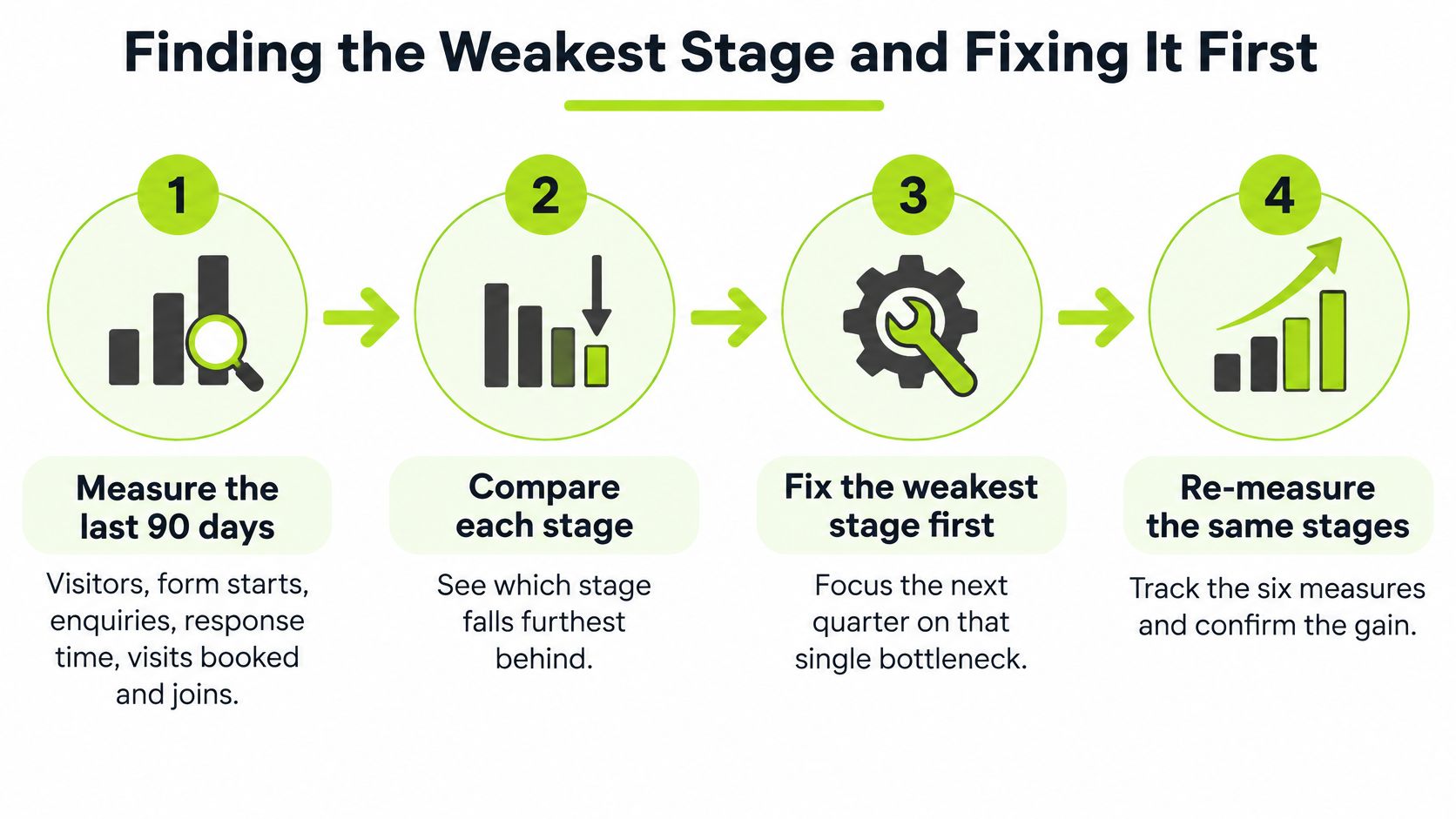
The biggest percentage drop isn't automatically the best place to spend. Some visitors are browsing, some enquiries aren't suitable, and some dates are already full. Look for the stage where a realistic improvement would produce the greatest additional contribution without exceeding capacity.
Use a consistent routine over the next quarter:
- Measure the baseline. Pull the last 90 days of visitors, form starts, enquiries, response times, visits booked and joins for the priority journeys.
- Compare with your own history. Check equivalent periods and separate changes in traffic quality from changes in page performance.
- Choose a single intervention. Shorten an unnecessary form, clarify a cost or reposition a booking button at the stage you've identified.
- Allow a meaningful test. Run the change for at least four weeks, extending it where volumes or booking lead times require more evidence.
- Confirm the commercial result. Check completed sales and revenue before moving to the next constraint.
Diagnose before assigning the work
If relevant traffic is strong but form starts are weak, investigate the page's offer, clarity and technical operation. Don't assume the form itself is responsible when visitors aren't even reaching it.
If enquiries are plentiful but visits are scarce, inspect response quality, availability and follow-up. Redesigning the page won't correct an unanswered request or a visit offer that doesn't suit the prospect.
For a broader checklist of testing considerations, the website CRO advice from MD TECH TEAM offers another reference. Keep your decisions anchored to club outcomes rather than adopting every suggested change.
At the 90-day mark, GolfRep recommends reviewing stage-by-stage conversion, speed-to-lead, visit-to-join performance, source-level revenue and retention. Our process focuses on response speed, visibility and booked visits in month one, then source quality, conversion consistency and retention in month twelve.
Golf club website conversion improves through specific decisions, not a general instruction to make the website better. Pull your own baseline, name the weakest commercially important stage and assign an owner to improve it before approving new expenditure.
GolfRep helps golf clubs connect website activity to bookings, membership sales and longer-term revenue, so managers can identify where improvement will matter most. Visit GolfRep to discuss mapping your priority journeys and measuring the commercial constraint in each.
Ready to tap into our proven growth system?