Golf Club CRM User Permissions: Who Should Access What

A volunteer helped with your spring open day. Two seasons later, their CRM login still works, and they can export every member's contact details. Nobody deliberately approved permanent access. Nobody set an end date either.
At GolfRep, our recommendation is to treat golf club CRM user permissions as separate decisions about actions, not a choice between administrator and ordinary user. Each grant needs a purpose, a named approver, an appropriate sign-in method and a point when someone checks it again.
Why Golf Club CRM Permissions Need Planning
A permission is the right to do something specific: view a member profile, change membership status, export contacts, send a bulk email or manage another person's account. Someone who needs the first action doesn't automatically need the others.
Golf clubs hold records containing names, addresses, dates of birth, membership history and payment-related information. A receptionist needs enough information to help a member at the desk, but that doesn't justify downloading the membership database onto a personal laptop.
England Golf's data-protection guidance recommends reviewing who in the organisation has access to personal-data records and whether everyone with access still needs it. Applied to CRM administration, that makes access review part of the club's UK GDPR governance, not an optional housekeeping exercise.
Start with the job, then the action
Two principles make the decision manageable:
- Role-based access: Give people a profile matched to their responsibilities, rather than copying the previous employee's settings.
- Least privilege: Include only the information and actions needed to perform that job.
- Recorded approval: Identify who authorised the access and the event that should trigger its review.
When comparing software controls, CIQRA's overview of security and compliance features is a useful reference point for discussing access protection with a supplier. Translate feature descriptions into practical questions about what your club can restrict and verify.
The commercial trade-off matters. Over-restrict access and staff invent workarounds, such as circulating spreadsheets. Grant everything and a routine mistake can affect the whole membership database.
Management test: For any user, you should be able to explain what they can see, what they can change and who approved it.
Permission Levels for Each Club Role
A receptionist may need a member's contact details without needing to change their membership category. Set each action separately using a matrix the general manager and department leads approve together. Yes means the role is eligible for that action, subject to approval and sign-in controls, rather than permanently enabled access.
Limited means restricted to approved fields, a section, a segment, a site or a defined task. No means the role shouldn't receive that action through its normal profile.
Default CRM access level for each club role
| Role | View member profiles | Edit membership status | Export data | Send bulk messages | Manage user accounts |
|---|---|---|---|---|---|
| General manager | Yes | Yes | Yes | Yes | Yes |
| Membership team | Yes | Yes | Limited | Yes | No |
| Reception and front of house | Limited | No | No | No | No |
| PGA and coaching team | Limited | No | No | No | No |
| Finance | Limited | No | Limited | No | No |
| Marketing (internal or agency) | Limited | No | No | Limited | No |
| Committee member (read-only) | Limited | No | No | No | No |
| Volunteer | Limited | No | No | Limited | No |
| System administrator (separate account) | Yes | No | No | No | Yes |
| Integration service account | Limited | No | No | No | No |
The ICO's access-control guidance recommends documenting roles' information requirements, creating role-based profiles and restricting sensitive information to formally assessed privileged roles. This matrix is a proposed club policy, not a statutory allocation.
For each grant, record a named owner, the approved sign-in method and a review point: a role change, departure or completion of a contractor's task. Shared logins make individual responsibility unclear; old accounts can retain rights after the need ends.
Interpret the sensitive cells carefully
Membership staff can amend renewals, categories and joining status without creating user accounts. Finance needs payment-related records and reconciliation fields, not coaching notes or unrestricted correspondence.
PGA professionals should see relevant bookings and coaching history, not payment records. Committee members should normally receive read-only reporting, preferably aggregated figures. Their Limited cell defines a reporting boundary rather than permission to browse identifiable profiles.
The integration account's Limited profile access can include explicitly approved field operations, such as writing engagement status. It shouldn't change membership status itself, delete members or extract the database. Keep its membership-status permission set to No. If the CRM bundles an approved field operation with those broader actions, leave that permission disabled.
F1Group's guide to understanding role based access control provides background for translating responsibilities into software settings. Assigning ownership of these decisions is part of country club management.
Control actions that can affect the whole database
I would make export the most tightly controlled routine permission. Keep eligibility to a small, named set of people, even where several roles have export-capable cells. Record each export's purpose, fields, destination and approval, then enable it only for the task.
Restrict bulk marketing to approved, consented member and prospect segments. Renewal-notice access shouldn't automatically permit promotional campaigns. Club-wide messages need a named approver, including messages sent by an agency or volunteer.
Reserve deletion and bulk updates for a separately authorised administrator task, with additional approval. Managing accounts shouldn't automatically confer marketing or export rights.
Could this person cause significant damage by accident with this right alone? If yes, narrow its scope or require approval before enabling it.
Mark every cell where the live CRM configuration differs from the approved matrix. Give each exception an owner and a review point so it remains visible until resolved.
Building Role Groups Instead of Single Accounts
Use named individual accounts, but assign their permissions through role groups. Change the approved group profile once and its members inherit the change, rather than relying on someone to amend each account correctly.
The NCSC's cloud-security guidance recommends applying permissions to named groups, granting only necessary access and detecting and removing unused permissions over time.
Build a recognisable club structure
Keep the starting structure close to how the club operates:
- Club Management: Inherits operational visibility and approved management actions, not permanently enabled export or increased administration.
- Membership Team: Inherits member-record maintenance and renewal workflows, without user-account management.
- Reception: Inherits necessary contact and booking information, without financial notes, exports or membership-status changes.
- PGA Team: Inherits relevant coaching and booking information, without general financial access.
- Finance: Inherits payment-related fields and approved reconciliation functions, without campaign sending.
- Marketing: Inherits approved segments, campaign tools and engagement results, without payment records or deletion rights.
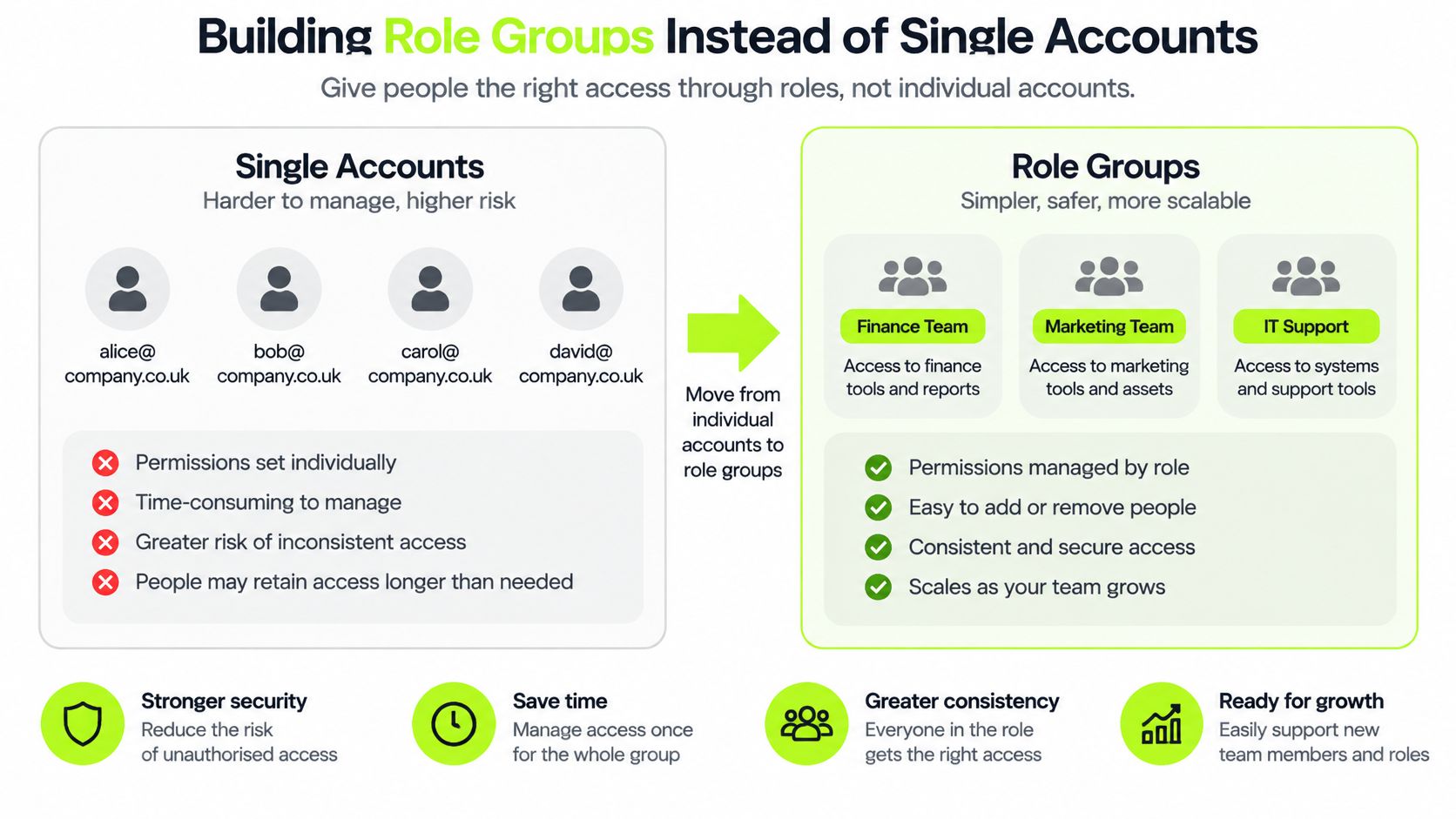
A new receptionist joins Reception and receives the approved profile. They don't need an administrator's account copied across to get started.
When that receptionist moves into membership administration, replace their group membership rather than adding another group. Otherwise, they can accumulate rights from jobs they no longer perform.
Keep expertise separate from authority
An experienced CRM user can help colleagues without becoming an administrator. SIX ERP's explanation of spotting power users across departments is useful when identifying internal support people, but software confidence alone isn't a reason to grant broader access.
For multi-site operators, combine the job group with a site restriction. A local membership colleague should work within their club, while a central commercial reporting role can receive cross-site figures without individual member records.
Where someone needs an exception, create a time-limited task group with a defined scope, approver and expiry. Avoid a bespoke collection of permissions attached indefinitely to that person.
Give the exception an end point before giving the user access.
Who Can Change Permissions and How They Sign In
A sound matrix won't help if everyone uses the same reception password. Named accounts let the club connect an action to a person rather than a shift, desk or department.
The NCSC's UK GDPR security guidance says access to personal data should be understood, documented and managed, with users appropriately authenticated and authorised and strong authentication considered for privileged users.
Separate daily work from privileged tasks
The general manager should use an everyday account for normal operations and a separate privileged account for approved permission changes, exports or deletions. That privileged login receives only the capabilities needed for the authorised task, rather than becoming an unrestricted master account.
Require multi-factor authentication for administrator and export-capable accounts wherever the platform supports it. If it doesn't, record the gap and consider it in the supplier decision.
Use a clear approval route:
- Admin-level changes: The general manager requests the change; the club secretary or finance lead countersigns.
- New export rights: Require the same independent approval before an administrator enables them.
- Supplier support: Approve access in writing for a defined task and period, with activity logged.
Make the record readable
A useful audit entry might read: Membership lead, export enabled for renewal reconciliation, approved by general manager and finance lead, expiry at task completion. The system should also capture the actual date, time, account, action and affected records.
Record who, when and why for permission changes, exports and deletions. A technical event log without an approval reason may show what happened without explaining whether it was appropriate.
Name the general manager as permission owner, with a designated deputy for absence. Give the committee a summary of exceptions, outstanding reviews and significant changes at each meeting, rather than issuing personal-data access so members can oversee the process.
What to Check Your CRM Can Do
The 2025 Golf Club Software Technology Report found that 66% of surveyed UK and Irish golf clubs were considering switching software providers, as reported by International Business Times. That finding doesn't establish permissions as the cause, but access controls deserve testing before a club commits.
Ask for a demonstration
Put these questions into the supplier review or tender:
- Role groups: Can we manage permissions through named groups?
- Export separation: Can users view records without downloading them?
- Audit evidence: Can we read and download logs of permission changes, exports and deletions?
- Site boundaries: Can central staff see cross-site figures without member-level access?
- Account closure: What happens to active sessions when an account is disabled, and can access expire?
- Support access: Can we approve supplier access case by case and inspect its activity?
- Independent approval: Can the system prevent someone granting export rights alone?
A specific answer demonstrates a restricted test account. A vague answer says the platform has flexible permissions.
Include these checks alongside the operational criteria in our guide to golf club management software. Resolving a mismatch before migration avoids the additional work of moving live member records again.
Leavers, Movers, Third Party Access and the First Clean-Up
Access that outlives the role it was granted for is the continuing risk. A departed employee's account may remain signed in on a device, while a contractor's completed project can leave behind a working connection.
The ICO's records-management and security guidance recommends formal access provisioning, adjustment or removal when responsibilities change, and periodic review of granted rights.
Make access closure part of the job
Use this operating procedure:
- Record access at the start. Keep the person's groups, purpose, approver and expected end point.
- Close access on departure. Remove rights on the last working day, revoke sessions and address shared credentials and signed-in devices.
- Replace rights when responsibilities change. Remove the old group as the new one takes effect.
- Put an end date on external work. Give contractors, freelance marketers and integrators a named club owner.
- Keep the evidence. Log every grant, change and removal with its date and reason.
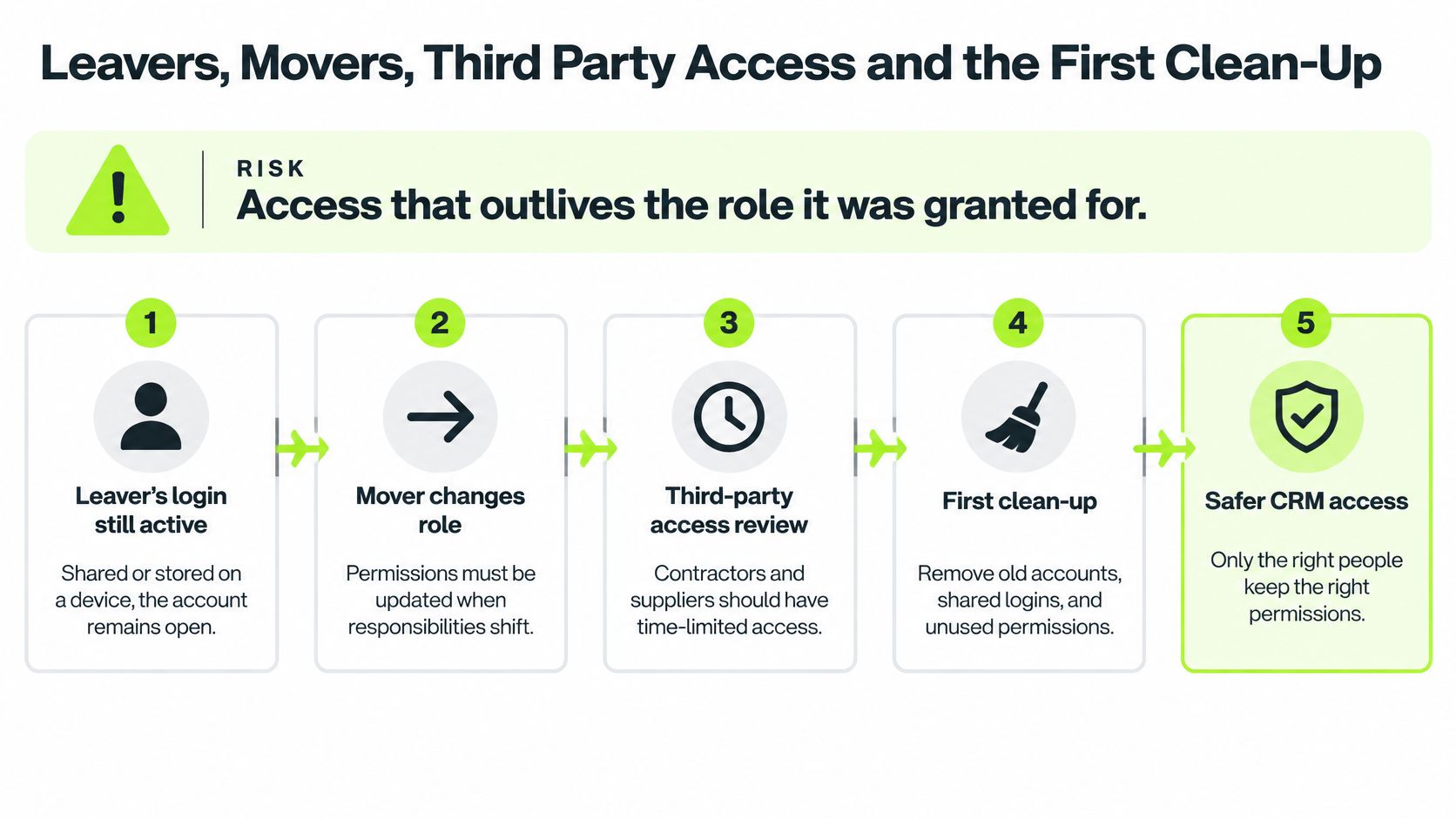
Permission review triggers and owners
The following is a recommended club timetable, not a statutory schedule. For role changes, remove inappropriate sensitive access immediately; the administrative review deadline isn't permission to leave unnecessary rights active.
| Trigger | Action | Owner | Timing |
|---|---|---|---|
| Staff member leaves | Remove all logins and shared access | General manager | Last working day |
| Role or site change | Move user to the new group and remove the old one | Membership lead or general manager | Within five working days |
| Volunteer season ends | Disable account or set an expiry date | Membership secretary | At season end |
| Contractor or agency starts | Grant time-limited group access | General manager | Before access is issued |
| Committee change | Update committee read-only access | Club secretary | At the annual meeting |
| Routine check | Compare live CRM settings with the matrix | General manager | Quarterly for admin accounts, annually for all users |
Complete the first clean-up this month
Turn the policy into a short, owned work list:
- Extract the account list, including each person's group and reason for access.
- Compare actual rights with the matrix, flagging excessive or unexplained permissions.
- Disable inactive accounts and replace shared logins with named accounts.
- Build the role groups and move people into their approved profiles.
- Name the approvers for exports and club-wide messages.
- Schedule the reviews, including the quarterly administrator check and annual review of all users.
Include automated connections and supplier identities, not just employees. If a system move is planned, use the same account inventory alongside your golf club CRM data migration preparation rather than carrying old access assumptions into the new platform.
Outsourced work still needs boundaries. At GolfRep, we manage setup, creative, campaign optimisation and automation, while the club's team handles warm and hot conversations or membership visits. That division of work should inform access, not justify universal administrator rights.
The practical evidence is straightforward: a permissions record, a named owner and a review date. If the club can produce those and reconcile them with the live settings, it can explain its decisions rather than rely on recollection.
GolfRep helps UK golf clubs improve commercial performance across acquisition, CRM, conversion and retention, with responsibilities and access matched to the work being done. Visit GolfRep to arrange an open strategic conversation about your current setup, goals and challenges, not a sales pitch, and map out what a workable growth system could look like for your club.
Ready to tap into our proven growth system?